Changelog

The latest improvements to Boom.

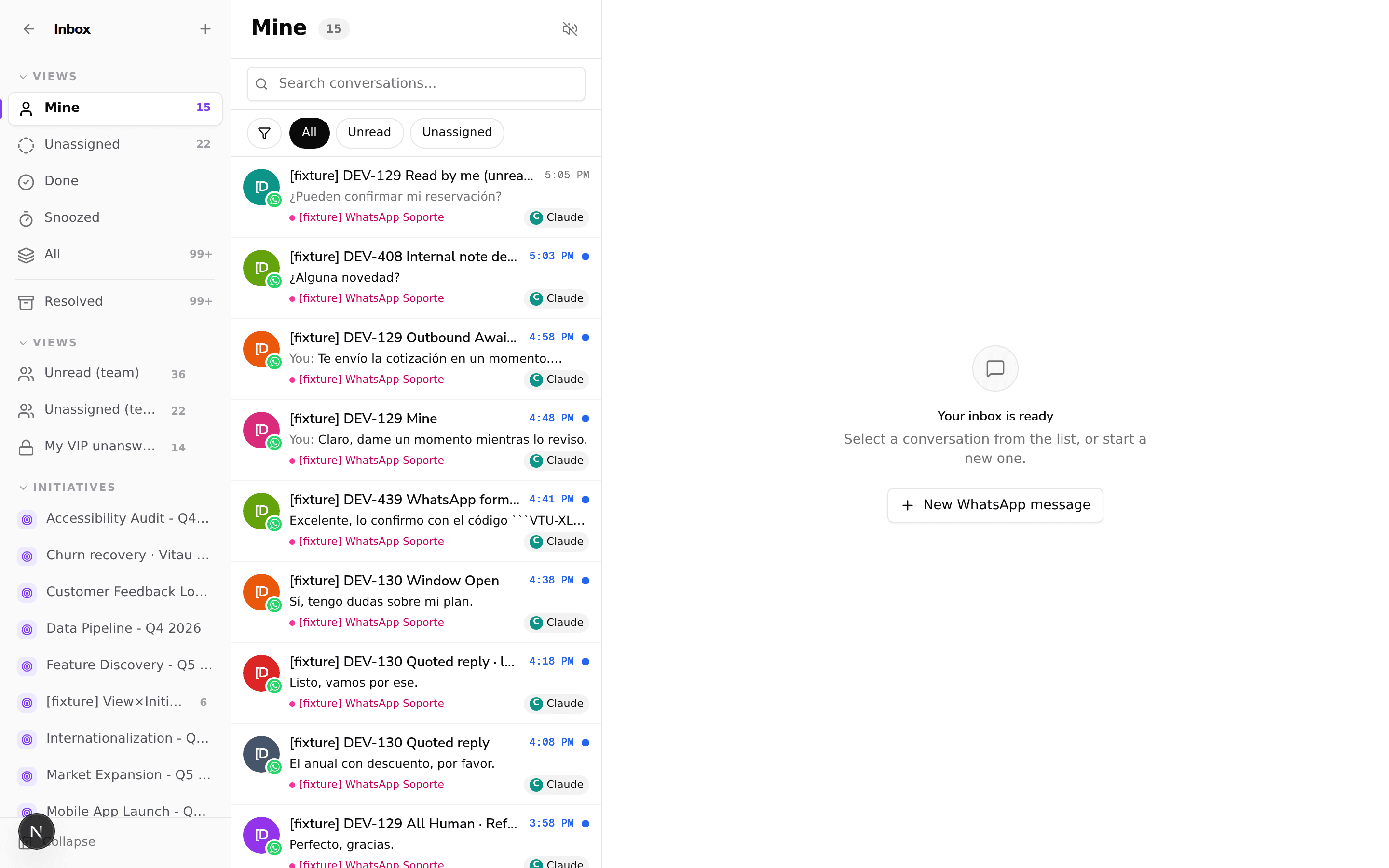
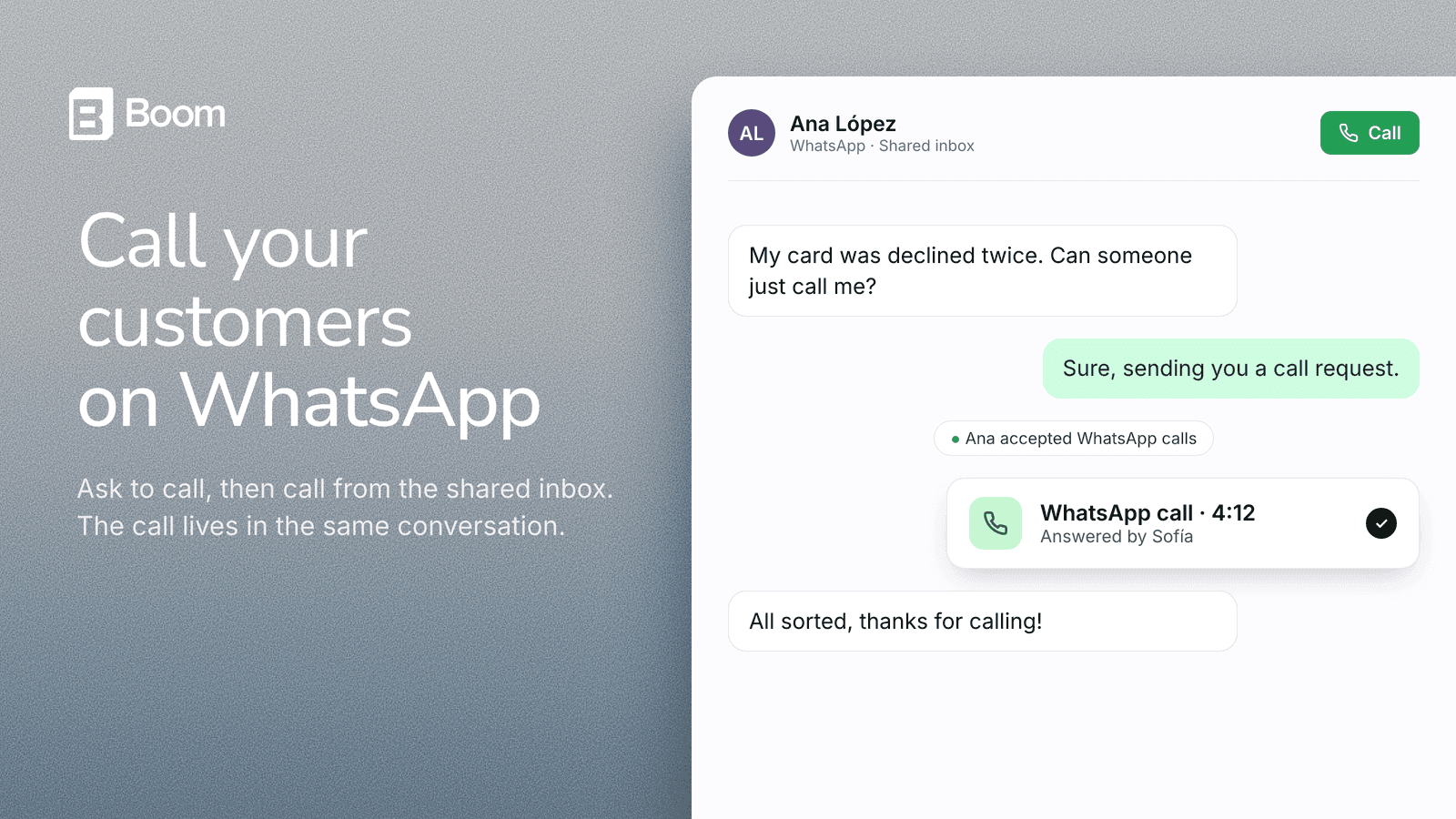
A WhatsApp conversation in the shared inbox: the customer asks for a call, accepts the call request, and a completed WhatsApp call card appears in the thread

Call your customers on WhatsApp from the shared inbox (early access)

You can now call customers on WhatsApp from the shared inbox. When a conversation needs a voice, press Ask permission to call and the customer gets a WhatsApp request to accept calls from your number. Once they accept, the button turns into Call and you talk from your browser, with no phone or extra app.

Every call is saved in the same conversation, so your team sees the whole history in one place. Calling is in early access and is enabled per WhatsApp number. See how to turn it on.
Minor improvements

A smaller update:

  • WhatsApp and email templates now live in one place. A single Templates section in the sidebar holds both, with a tab for each channel, so you no longer have to hunt through settings to find them. Your old links still take you to the right tab.
  • Inbox filters (unread, unassigned, channel, date, tag) now narrow only the conversations waiting on your team, instead of also pulling in the ones the AI is still handling. Search still looks across everything.

Minor improvements

A smaller update:

  • The shared inbox now groups conversations above a divider when they need a person (yours, unassigned, done, snoozed) and keeps what the AI is handling below it, so it is clearer at a glance what is waiting on a teammate.
  • The terms acceptance dialog no longer reappears after you accept it when moving between sections.

Minor improvements

A smaller update from this week:

  • Choose the WhatsApp template category (Utility, Marketing or Authentication) when you create a template, so it is submitted for approval in the right category from the start.

Journeys can check the record that enrolled someone, as it is right now

A journey that starts from a segment can now re-read the record that put the person in it. The new Matched record (live) condition in a Decision tests the record's current values, so you can ask "is the order that enrolled this person still pending_approval?" and stop the reminder once it moved on. In a Case, pick Matched to branch on the record's current value. If the record was removed or no longer exists, the person follows the default path.

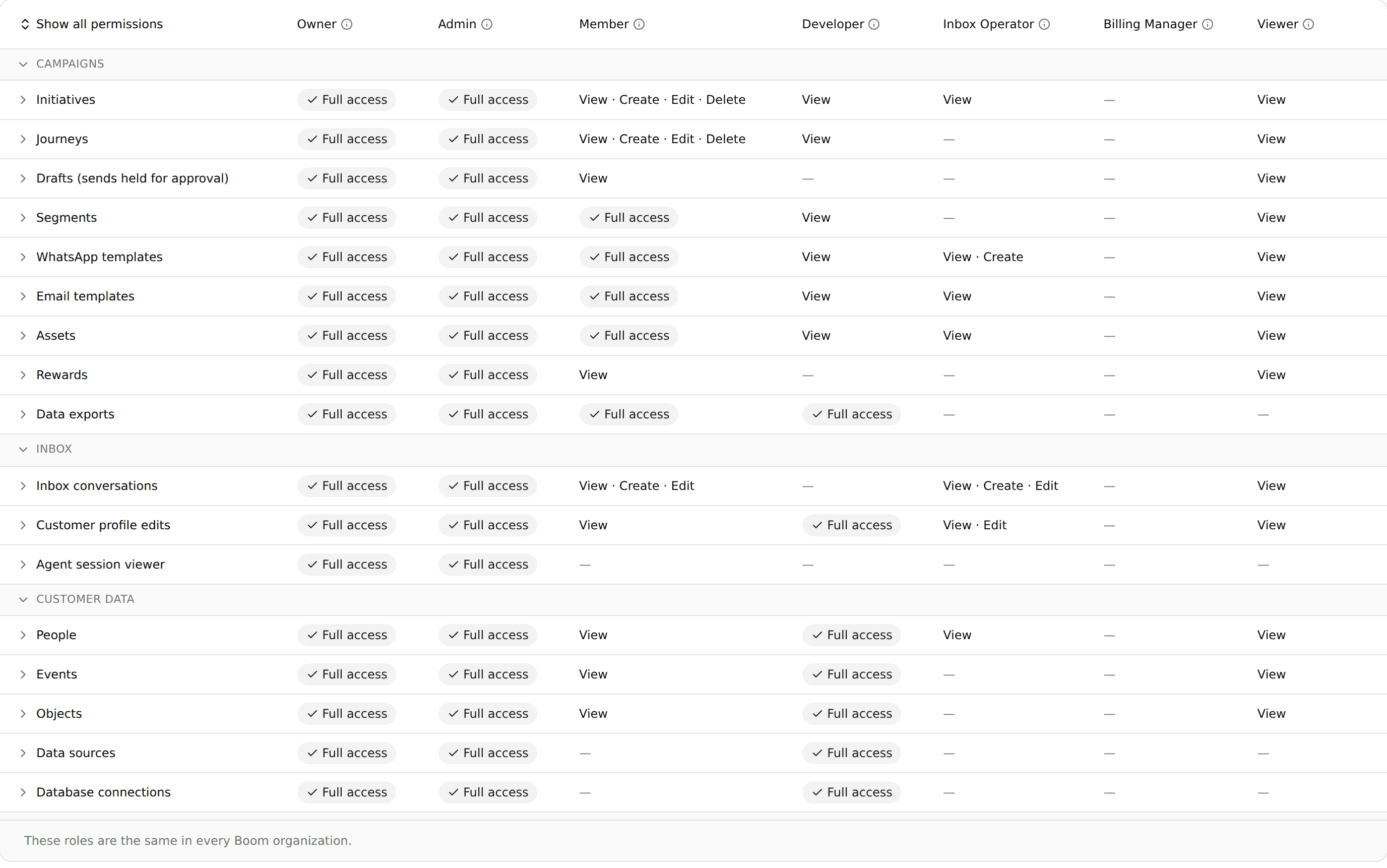
Settings > Organization > Roles: a table of what Owner, Admin, Member, Developer, Inbox Operator, Billing Manager and Viewer can do across campaigns, inbox and customer data

Give each teammate the right access with seven standard roles

Boom now has seven standard roles: Owner, Admin, Member, Developer, Inbox Operator, Billing Manager and Viewer. Each person has exactly one, and it decides what they can launch, publish, approve, export and send as rewards, in the app, through the API and in the assistant. Buttons a person cannot use are hidden or disabled instead of failing with an error, and each role lands on a page it can use: Inbox Operators open the inbox, Billing Managers open billing.

Owners and Admins can see exactly what every role can do in Settings › Organization › Roles. Expand any row to see the individual actions. Change someone's role in Organization › General › Members.

Minor improvements

A handful of smaller customer-facing improvements:

  • See delivery for every message through a new message logs API, including who did not receive a message or blocked the number.
  • Emails sent from a journey now appear in the inbox as an email card with subject and preview, instead of a plain text bubble.
  • Email conversations started by a campaign are assigned to the agent instead of landing in Unassigned.
  • A conversation handed off to a human is no longer closed by the automatic inactivity follow-up.
  • A past-due account with no card on file now sees exactly what payment is still pending.
  • Journey messages resolve person fields like the contact first name reliably, and an unknown field is caught when you publish instead of failing a live send.
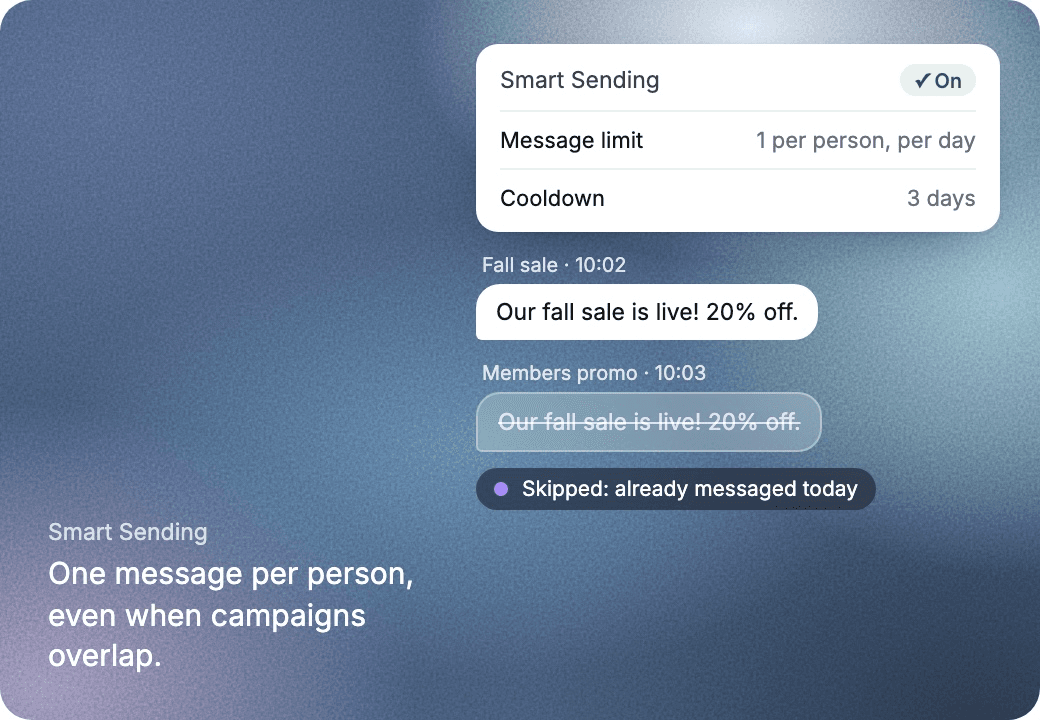
Smart Sending is on: the second copy of the same promo is skipped because the person was already messaged today

Never over-message a customer: Smart Sending is live

Campaigns, reminders and follow-ups each make sense on their own, but your customer gets all of them. Smart Sending lets you control how often each customer hears from you, across everything you send from Boom. Set it once in Settings › Smart Sending:

  • Message limit: at most a set number of messages per person in a window, like 1 a day on WhatsApp. A journey message that would go over it is skipped.
  • Cooldown: after one initiative writes to someone, no other starts with them for the days you pick, up to 90.
  • Exceptions: order updates, failed payments and other messages people need always go out.

The agent's replies never count, so a customer who writes always gets an answer. Before you turn a limit on, Boom shows which initiatives would lose messages, and afterwards every skipped run is labelled in Executions with the rule that stopped it. See how one brand sent 72,600 messages without anyone getting the same promo twice in the story, or learn how it works.

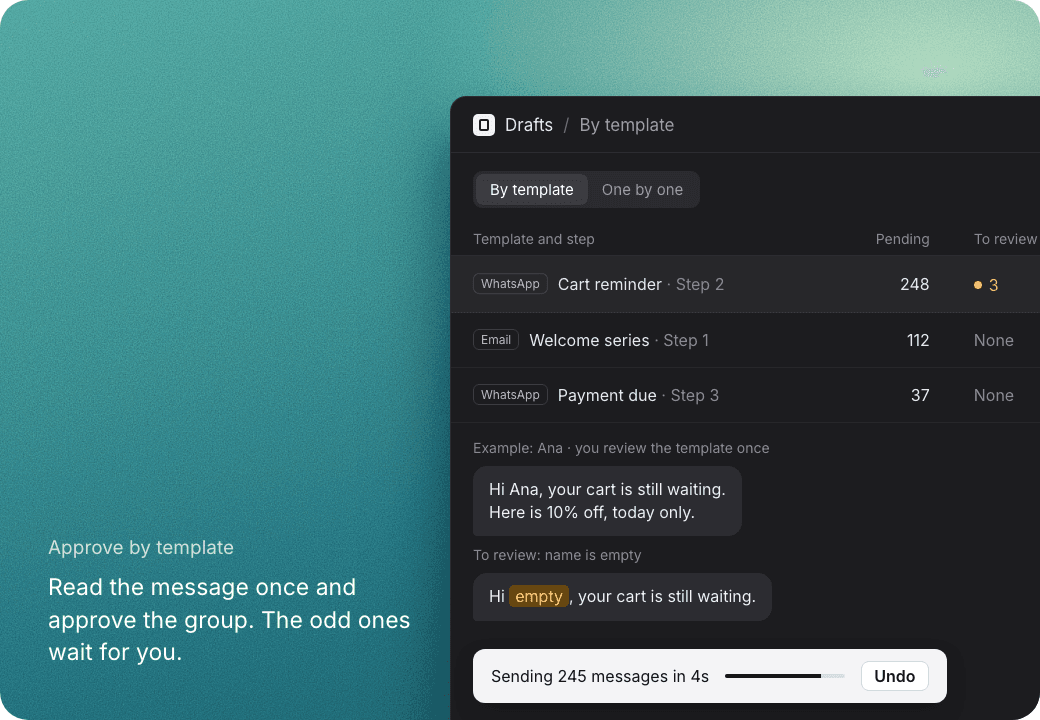
The Drafts tab grouped by template: a cart reminder with 248 pending and 3 to review, an example message, and 245 messages sending in 4 seconds with Undo

Approve journey messages before they go out

A journey's send step can now wait for approval. Set its Delivery to Draft for approval and each WhatsApp template or email it would send is prepared in full and held in the initiative's new Drafts tab. Your team previews the exact message, then approves or rejects it one at a time, in a selection, or everything matching a filter. Approved drafts go out exactly as previewed, and rejected ones send nothing and can follow their own Rejected path in the journey.

Reviewing is built for volume. The By template view groups the drafts that share a template and step, so you read the message once and approve the whole group. Drafts where a WhatsApp variable came out empty or at zero are marked To review and left out of a group's approval or Approve all until you include them. Every approval waits 5 seconds before anything is sent, so you can undo it, and the tab then shows what was sent.

Run a journey in parallel, one run per event

A journey can now run a separate copy for each value of an event property, for example one run per payment link. Turn it on with a field in the builder, and a stop event cancels only the matching run instead of the whole journey. Existing journeys keep working exactly as before.

Send transactional messages triggered by your app

Boom can now send transactional initiatives, messages triggered by an event in your app through the API, like an order confirmation or a payment reminder. Set one up on a single screen, launch it with one API call, and follow every message in its own analytics tab from sent to delivered to read. A dedicated API panel and a public guide walk your team through the setup.

Minor improvements

A handful of smaller customer-facing fixes:

  • Two images placed side by side in email columns no longer drift out of line from a stray default padding.
  • The web widget keeps its menu reachable while nudges are showing.
  • Journey send steps now show the live name of the template they will send.
  • Bulk starting a journey tells you why some contacts were skipped.
  • Publishing a journey now blocks a template placeholder that has no message bound to it.

See whether each email was delivered

The message log now shows the real delivery state of every email, not just that it left Boom. Each email moves to delivered or failed as the provider reports back, a bounce or complaint shows its reason, and a hard bounce ends that person's journey so you stop sending to an address that cannot receive. You can also filter the log by channel to look at email on its own.

A refreshed look for the chat widget

The web chat widget has a refreshed look, with a glass launcher and panel and smoother motion as it opens and closes. It is a visual update only, so your existing installation keeps working with no change on your side.

Minor improvements

A batch of customer-facing improvements from recent releases:

  • Email campaigns reach contacts without a phone number. An initiative that sends on email now reads its channel from the journey, so it no longer skips people who have an email but no phone.
  • See which comment a private reply answered. In the shared inbox, a private reply on Instagram or Messenger now shows the public comment it was responding to.
  • The in-app assistant follows your app language. The operator assistant now replies in the language your dashboard is set to, instead of defaulting to another one.
  • Full template id in the agent panel. Message templates now show their complete Content SID when the agent panel is open.

Run your email program in journeys

Email is now a full channel inside Boom. Your journeys can send email, you can build and edit email templates from the builder or in HTML (and now through the API), you can send from several named addresses per organization and choose one per template or per step, and every marketing email carries a working one-click unsubscribe so you stay compliant with bulk-sender rules.

Reach customers on Facebook Messenger

You can now reach customers on Facebook Messenger end to end. Connect a Facebook Page as a native channel, send Messenger messages from a journey the same way you already do on WhatsApp and Instagram, and let a Messenger message start a journey so a conversation can begin the moment someone writes to your Page.

Recover abandoned Shopify carts

Boom now tracks Shopify carts as data you can act on. A created cart can start a journey and a completed checkout cancels it, so you can follow up on an abandoned cart automatically, and your agent can read seller-defined product details (like a shoe's fit guide) that were not available before.

Turn Instagram and Facebook comments into conversations

A comment on your Instagram or Facebook post can now start a conversation. When someone comments, Boom enrolls them into a journey without waiting for a direct message, and because a comment does not open a messaging window, the flow sends a private reply to that comment so the person still hears back instead of dropping out silently.

Minor improvements

A batch of customer-facing improvements from recent releases:

  • Agent session viewer for admins. Organization admins can open a redacted transcript of their own conversations to see what the agent delivered, drafted, and did, without asking us.
  • Share a file straight from the agent chat. Drop a file into the agent chat and it is saved as a reusable asset the agent can send to customers or a campaign can reference, and the agent can now read spreadsheets you share with it.
  • Recently used templates first. The inbox template pickers now surface the templates your team sent most recently, on top of the full list.
  • Set a success metric over the API. You can now read and set an initiative's success metric through the API, not only in the interface.
  • Use the matching record inside a journey. When a segment matches a specific record, its fields are offered as their own variable group, so a message uses the exact row that brought the person in.
  • Email builder additions. Add a social-icons block to a footer, set the spacing below any block, and control corner rounding per corner.
  • Test an email template against a real contact. Preview a template filled with a real person's data before you send it.

Minor improvements

A batch of refinements from recent releases:

  • The shared inbox now shows a WhatsApp template's footer text on the message bubble, alongside the header and body.
  • The journey canvas no longer shows a persistent "add a block" hint pointing at the palette.
  • The test-send dialog for an email template now says exactly who it will send to, instead of reading like it went to the person or segment you had selected.
  • An invalid request to the public API now says exactly where the JSON body broke, instead of a generic error.
  • A .csv file uploaded from Windows is now stored and read as a spreadsheet, instead of being misread as a legacy Excel file.

One-click unsubscribe on every email

Every template and journey email now supports one-click unsubscribe, using the same header major inbox providers like Gmail and Yahoo look for on bulk senders, so opting out takes a single click instead of a reply. Add the {{engagement.unsubscribeLink}} variable to any email footer to link straight to it.

Start a journey from a Messenger message

A journey can now start when someone messages your Facebook Messenger page, the same way it already can from WhatsApp, SMS or Instagram. Set an entry point to listen for any message or a specific keyword, so a customer reaching out on Messenger enters the right journey automatically.

Choose which Facebook Pages you connect, and reconnect in one click

Connecting a Meta channel now lets you pick exactly which Facebook Pages to bring in, so a workspace only connects the Pages it actually owns instead of every Page available. And when a Meta channel's connection expires, a Reconnect button now shows up right on that channel's row to restore it, instead of leaving it stuck.

Send email from multiple named senders

Your organization can now hold several named senders for email, each with its own display name, From address and Reply-To, instead of one shared sending address for everything. Pick the sender per template or per journey email step, see exactly how it will look in a customer's inbox from the new Senders tab, and check which sender each step sends as right on the journey canvas.

Minor improvements

A batch of refinements from recent releases:

  • The manual add-people picker now finds contacts who only have an email on file, so you can enroll them by hand, not only contacts reachable by phone.
  • The agent now reads a quoted reply correctly instead of losing what it points to, and tells a customer plainly when an action was blocked instead of claiming it went through.
  • The journey variable picker can now offer the exact record that matched a segment, as its own group of variables, so you can bind the record that actually put someone in the segment.
  • A WhatsApp template variable can now hold fixed text you type directly, not only a variable pulled from the flow, useful for something like a discount code that is the same for everyone.
  • The agent can now search the full contents of a spreadsheet asset you upload, instead of only reading a truncated preview of it.

Add social icons to your email footers

Email footers can now include social icons. Add a row of linked icons for Instagram, Facebook, TikTok, X, LinkedIn, YouTube and WhatsApp, set each profile link, and choose the alignment, size, spacing and style (brand colors, dark or light). The block nests inside containers and columns like any other, so you can build a complete footer without leaving the email builder.

Minor improvements

A batch of customer-facing refinements from recent releases:

  • The email builder gives you finer layout control: set the corner radius on each corner of an image, button or container, and adjust the space below any block.
  • Email templates now let you copy and format the raw HTML source and find the body variables, and you can drop an .html file straight into the composer.
  • Journeys can personalize an email from the data of the event that triggered the flow, let you choose which file types an HTTP step sends, dim the Instagram send step until an account is connected, and roll a flow back to a previous version.
  • Initiatives let you reference tools and guiding questions from the @ picker, and read or set an initiative's success metric over the API.
  • The inbox assistant renders an HTML email draft and an attached image inline, so you see them before applying.
  • Segments now accept a comma inside a multi-value filter.
  • Contact data can recover a customer's phone number from their saved address.

Write and test HTML email templates

The email template builder now has a code mode alongside the visual editor: write raw HTML, format it, drop in an .html file, and copy the source back out. You can also test a template against a real person from your CDP, so you see exactly how the variables resolve before anything sends.

Connect Facebook Messenger as a native channel

Boom now supports Facebook Messenger as a native channel: connect your Facebook Page and the agent sends and receives Messenger messages through the same journeys and inbox as your other channels. Messenger connect sits right next to Instagram and WhatsApp in your channel settings, so every conversation your customers start reaches the same place.

Minor improvements

A batch of refinements from recent releases:

  • Segments let you type a comma inside a multi-value filter, so a value that contains a comma no longer breaks the filter.
  • A journey HTTP action can now choose which file types it sends and withhold the types an endpoint rejects, so a document that would bounce never leaves.
  • The Instagram send node is dimmed until an Instagram account is connected, so it is clear when the step can actually run.
  • You can read and set an initiative's success metric over the API, so the metric is available to your own integrations.
  • When authoring an initiative, you can reference tools and guiding questions from the @ picker on the objective, not just in the body.
  • Attached images are handled directly: an image shows inside the operator's own message in the inbox, and the agent works from the image itself rather than a description of it.
  • An empty billing card keeps its name, its controls and its way out instead of collapsing into a dead end.

Test an email template against a real contact

You can now test an email template against a real contact from your CDP. Pick a person and see the template rendered with their actual data before you send, so variables and personalization are verified against real values instead of placeholders.

Minor improvements

A batch of customer-facing refinements from recent releases:

  • An empty billing card keeps its heading, its period controls and its links instead of collapsing into a blank box.
  • The balance card no longer counts purchased top-up credit as part of the period allowance, so a topped-up account reads correctly.
  • The Studio composer accepts an .html file dropped, pasted or picked, not only images and documents.
  • When you test an agent tool, a request that was never sent now explains why (for example, a missing contact) instead of blaming the URL.
  • Shopify contacts recover a phone number saved on the address when none is on the customer record, so more people are reachable. An address phone is never treated as messaging consent.
  • An initiative's guiding questions keep the order you arranged them in, and editing one question's field no longer overwrites another.

Reference a tool or question from an initiative's instructions

When you write an initiative's instructions, you can now reference a tool or a guiding question by picking it from a menu with @ instead of typing its name. A referenced tool or question stays linked to the real one, so renaming it keeps working and a typo can no longer point the agent at something that does not exist. It works in both the context and the objective.

Choose which file types a journey sends to your endpoint

An HTTP request node in a journey can now choose which file types it sends. When a step forwards a customer's uploaded documents to your endpoint, you can restrict it to the formats that endpoint accepts (for example, PDF only), so files it cannot read are never posted. The option sits with the node's other advanced settings and lists the exact types, and existing journeys keep sending everything unless you narrow it.

The assistant reads the image you attach

The assistant now sees the image you attach, not a description of it. Hand it a screenshot of an email design and it can rebuild that design as HTML, and the file you send now appears inside your own message in the conversation instead of disappearing once the turn ends.

Write an email in HTML

You can now write an email in HTML instead of stacking blocks. A code editor lets you paste in a design, format it with one click so a model's single line of markup becomes readable, and copy the source back out to keep iterating. The template gallery now leads with Start blank and Write HTML cards so both starting points are obvious, and the approval card renders an HTML draft the way it will actually send, naming anything the sanitizer removed so nothing is lost quietly.

Minor improvements

A batch of refinements from recent releases:

  • The assistant can now rebuild a design from a screenshot you send it, instead of replying that it cannot read the file.
  • When a customer tags your brand in an Instagram story, the agent can see the story image and respond to it as the shout out it is, rather than asking what the file is.
  • Journeys can now check how many new documents a conversation received, so a flow only calls an external validation step when something new actually arrived.
  • Correcting the permissions a Shopify connection asks for no longer requires re-entering the app credentials, so a stuck install can be unblocked in place.
  • Image attachments you send now appear inside your own message in the conversation, so a photo stays visible in the thread instead of only in the composer.
  • Large numbers are grouped in the local style across high-volume screens, so counts read naturally.
  • The tool test panel now shows the response body when a request fails, so you can debug a tool without wrapping errors in a success response.
  • Duplicating an initiative now shows a loading state while the copy is created.

Write email templates in HTML, or build them with richer layout

Email templates can now be authored in HTML directly: choose code mode when you create a template, write the markup yourself with a live preview, drop in {{variables}} that resolve at send time, and let the AI assistant draft the HTML for you to refine. The drag-and-drop builder also gained real layout, so you can nest blocks inside containers and arrange them in side by side columns, and undo and redo protect your edits. Every template you save is ready to reuse in a journey or a broadcast.

Minor improvements

A batch of refinements from recent releases:

  • The email builder no longer silently loses what you type. Paragraph breaks now survive into both the formatted and plain text versions of a message, pasted content that carries no plain text is ignored instead of clearing your draft, and choosing a new image replaces the selected block instead of leaving an empty one behind.

Minor improvements

A batch of refinements from recent releases:

  • The credits page now states the exact charge in a dialog before you confirm, and it explains when a top-up would be refused or when no card is on file, instead of failing silently or sending you to support.
  • The inbox now shows and searches a contact by their profile name when the linked customer record has none, so a person no longer appears as a raw id.
  • Journey building now surfaces every connected channel, including SMS and Instagram, when you pick where a step sends, not just WhatsApp.
  • A document that will not open now asks the customer to send it again, instead of confirming it was received when it could never be read.
  • Web chat widgets hosted on Shopify now receive the agent's reply, closing a gap where a message could go unanswered.
  • The in-app assistant now confirms when a file you attached was sent, and no longer discards that file when a turn is declined.
  • Journey tools now return your draft when you filter by draft status, even when the initiative also has a published journey.

Send an Instagram message from a journey

Your journeys can now send Instagram messages, not only listen for them. A flow can reply to a customer's Instagram DM and keep the conversation going on the same channel, so an Instagram journey works from the first message through to the last instead of stopping after the first inbound message. The builder also guards what Instagram enforces: it warns as a message nears Instagram's length limit and blocks publishing one that is too long, and a send Instagram will not accept (for example, one outside the allowed messaging window) now fails fast and is reported clearly instead of being retried and marked as delivered.

Minor improvements

A batch of refinements from recent releases:

  • The customer directory now links relationship rows to the related profile instead of leaving them as dead ends, and searching a person by their full name works even when the name is stored as separate first and last fields.
  • The organization switcher is now searchable and height-capped, so an account with many organizations gets a scrollable list with a search box instead of a menu that runs off the screen.
  • The studio assistant now shows what it is doing while it works, and pressing Enter no longer fires a second turn: a message typed mid-turn is queued and sent when the current turn finishes.

Minor improvements

A couple of billing accuracy fixes from this release:

  • A utility template that WhatsApp counts inside its free service window is no longer billed as a paid send, so your usage total reflects only what you actually owe.
  • On the billing settings page, the balance meter now reads consistently: the usage text and the progress bar always show the same number.

Minor improvements

A batch of refinements from recent releases:

  • The agent no longer stays silent after preparing a reply and loading a follow-up skill in the same turn, a case that could leave a customer without an answer.
  • The agent now answers in the language the customer insists on, even after switching mid-conversation.
  • A journey HTTP node now receives the conversation it is acting on, renders \n in a JSON body as real line breaks, and shows its variable chips more clearly.
  • Journeys can count a customer's inbound documents and branch or respond on that count.
  • The command menu now reaches the all-channels page.
  • Inbox operators now land on the shared inbox right after signing in.
  • A journey step no longer offers a business-hours window the engine does not honor.
  • Brands can keep the Spanish opening question mark in outbound messages, with the option shown only where the mark applies.
  • A tool call can no longer reach a customer as raw message text.
  • The {{person.phone}} variable now resolves, and a blank value says so plainly instead of sending an empty token.

Branch a journey on how a conversation closed

A journey can now branch on how a conversation closed, so what happens next follows the real outcome (the customer reached the goal, asked to stop, or went quiet). The close reason is saved as a step output you can reuse downstream and is reported on the journey_run.ended webhook, and the builder now lays out one branch per close reason for you instead of asking you to type each value by hand.

Connect Instagram as a native channel

Boom now supports Instagram as a native channel: connect your account and the agent sends and receives Instagram direct messages through the same journeys and inbox as your other channels. Instagram and Messenger both appear on your channel settings overview, so every connection lives in one place.

Route a customer into another initiative mid-journey

A journey can now route a customer from one initiative into another partway through, so you can hand a contact from an onboarding flow into a research flow without starting over. The receiving initiative picks up the conversation in context.

Minor improvements

A few refinements from this release:

  • Journey messages can now format the variables they insert, showing a value as currency, a date, a running total, or a chosen item from a list, so a message reads exactly how you intend.
  • Journeys can branch on how recently a contact last messaged on WhatsApp, which makes it simple to route around the messaging window.
  • A journey step's outputs are now easier to find and reuse as variables in the steps that follow.
  • A journey validation notice now shows its real message instead of an internal label.
  • The toll-free SMS setup now collects the business details required to file and shows your submitted application in place of an empty form.

Send a free-text WhatsApp message from a journey

Journeys can now include a step that sends a free-text WhatsApp message you write yourself, not only a pre-approved template. The builder flags when the 24-hour messaging window is closed, so you always know when a template is still required.

Minor improvements

A smaller refinement from this release:

  • The channel settings pages now show one consistent, accurate status for each channel, so a setup step you have not reached yet no longer looks like an error and each channel reads clearly as ready or not at a glance.

Minor improvements

A few smaller fixes and refinements from this release:

  • Conversation handoffs now show who moved a conversation to the AI, naming the teammate who did it or marking it as automatic, instead of implying a person every time.
  • The chat widget no longer fights the host page's layout on mobile, so it opens and scrolls cleanly on phones.
  • When the agent reports how many records match, it now gives an exact count and flags when a list is only partial, instead of implying it showed everything.
  • SMS messages now fill in variables like the recipient's name, respect a working opt-out (reply STOP), and support per-message emoji.
  • The document dashboard now counts formats like screenshots and unreadable PDFs from the files themselves, so the totals match what customers actually sent.

Route incoming messages to journeys by keyword

One phone number can now serve several journeys at once. Keyword routing sends each incoming message to a different journey based on what the customer writes, so price can start your quoting flow while invoice goes to billing, with a catch-all for everything else.

Minor improvements

A few smaller fixes and refinements from this release:

  • The web widget on mobile no longer lets the page behind it scroll or shift, sits in the right place, and typing in it no longer lags on iPhone.
  • Insights key quotes now show only what the customer actually said, instead of occasionally quoting the agent's own messages under a customer's name.
  • Yes/no guiding questions now record a "no" as a no, so their charts reflect real answers instead of reading as all yes.
  • The inbox timeline now names who handed a conversation to the AI, a teammate by name or the automatic routing, instead of a single generic label.
  • The agent answers about your records more precisely: when someone asks how many contacts match or to find one by an identifier like an account number, it now counts exactly, says when a list is only partial, and can look a contact up by that identifier directly.

Send SMS from your journeys

You can now reach customers over SMS straight from your journeys. A new send node composes the message and shows a live preview with the opt-out footer and the exact number of billable segments before anything goes out, so SMS reminders and campaigns can run right alongside your existing flows.

A cleaner web widget redesign

The web widget got a cleaner redesign: the visitor panel is now one tinted surface with the agent's replies sitting directly on it, and the launcher comes in two styles so it stands out on any site. The refresh also improves color contrast and fixes several iOS keyboard and scrolling issues.

Minor improvements

A few smaller fixes and refinements from this release:

  • Settings pages now use the breadcrumb as the page title, with a single consistent card underneath.
  • Stopping an agent run no longer unassigns the conversation, so it stays with whoever was handling it.

Minor improvements

A few smaller fixes and refinements from this release:

  • Segments that sort by a number column now order correctly.
  • Custom object types can now require that every search result carries key attributes, so the agent always has details like a product slug instead of guessing them.
  • More web widget polish: correct styling for the components the panel renders, faster appearance updates, and a lighter panel payload.

Send and receive images in the web widget

The web widget now supports images in both directions. A visitor can attach a photo for the agent to read, and the agent or an operator can send one back, all natively inside the panel. Images are proxied through Boom so nothing loads from a third party, and the inbox composer gains an attach button for widget replies.

Edit a launched initiative without pausing it

You can now use Edit on an active or paused initiative to update its objective, guiding questions, and agent instructions, no need to pause or relaunch it. The change reaches the very next conversation, and removing a guiding question that already collected answers stays blocked to protect your data.

Give the web widget a compact card size

The web widget now offers a compact panel height, capped around 560px, so it can sit on your site like a chat card instead of stretching the full height of the page. Pick it from the widget's appearance settings; the default stays full height, and the mobile layout is unaffected either way.

Minor improvements

A few smaller fixes and refinements from this release:

  • The web widget now renders links as clickable chips with a real label, instead of showing the raw URL.
  • The web widget opens instantly on a visitor's first click, and we fixed an issue that could keep it from loading once installed on a live site.
  • Each message of a multi-part reply in the web widget now shows as its own chat bubble instead of being merged together, and the widget keeps the conversation open across a single-page app's route changes.
  • The web widget's composer now centers your text and highlights with your brand's accent color when focused, and clicking outside the panel closes it.
  • When a customer opts out by texting a keyword like STOP, the conversation now shows an internal note explaining why and hands off to a person, instead of going silent.

Minor improvements

A few smaller fixes and refinements from this release:

  • A conversation held for a human handoff now resumes with the agent when a new journey starts, so it no longer stays silent when no one picked it up.
  • Replies are no longer cut short by an unusual character in the response, so customers receive the full message.

Minor improvements

A few smaller fixes and refinements from this release:

  • The inbox now shows why an outbound message failed right in the conversation, so you no longer have to leave it to find out.
  • A journey run that stops now surfaces in the inbox and in the run drawer, so a halted run is visible instead of silent.
  • The inbox now renders automated sends as automated instead of labeling them as if a teammate sent them.
  • When the agent cannot read an attached file, it now tells the customer why, not just that it failed.
  • The template preview now fills in a template's own sample values instead of positional guesses, so the preview matches what customers actually receive.
  • Template button links are now fit to their approved base, preventing a broken or duplicated destination URL.
  • Attachment filenames no longer skew the conversation's detected language, so replies stay in the customer's language.

Campaigns, a home for your one-time sends

Campaigns now have their own section, separate from your recurring Initiatives: use one to reach a set of customers a single time, with a clear start and end, and get a report back. Your existing links keep working, so nothing you saved breaks.

Minor improvements

A few smaller fixes and refinements from this release:

  • Your webhook events now echo back your own event id on all three event types, so you can match a Boom event to the record on your side without keeping a translation table.
  • The Webhooks settings show each destination as an environment matrix instead of a flat row, so it is clearer where each event actually goes.
  • Settings, Webhooks now links straight to the public documentation.
  • A webhook test ping that partially succeeds no longer reports as a total failure.
  • A template inside an open 24 hour window no longer locks the inbox composer, so you can keep replying freely.
  • Publishing a journey is now blocked when a send step uses a template that cannot be sent, catching the problem before it reaches customers.

Filter your inbox by the day a conversation happened

You can now narrow the inbox to the conversations talked to on a given day. The date filter offers Today, Yesterday, the last 7 days, or a custom range, so finding the right conversation no longer means scrolling the whole list.

Know the moment the AI hands a conversation to a human

When the AI agent escalates a conversation to a person, Boom can now tell your systems in real time. A new conversation.escalated webhook fires with the conversation id and a direct link to the Shared Inbox, so your team can step in without watching the inbox all day.

A clearer starting point for every journey

Building a journey now starts with a clearer entry. The entry trigger reads as a card at the top of the canvas, and its title tells you at a glance which trigger starts the journey. You configure it in a panel right beside the card, so setting up how a journey begins stays in one place.

See which outcome each success reached

Your journey analytics now show where success happens. The successes chart breaks down by outcome node, so you can see which ending each conversion reached instead of one combined total.

Minor improvements

A few smaller fixes and refinements from this release:

  • The Publish button no longer shows on a draft that has never been published, so the first action you see matches what the draft can actually do.
  • The analytics dashboards no longer get stranded when a custom date range is left without dates.
  • Dark mode was rebuilt on a cleaner elevation ladder, so surfaces read with more consistent depth.

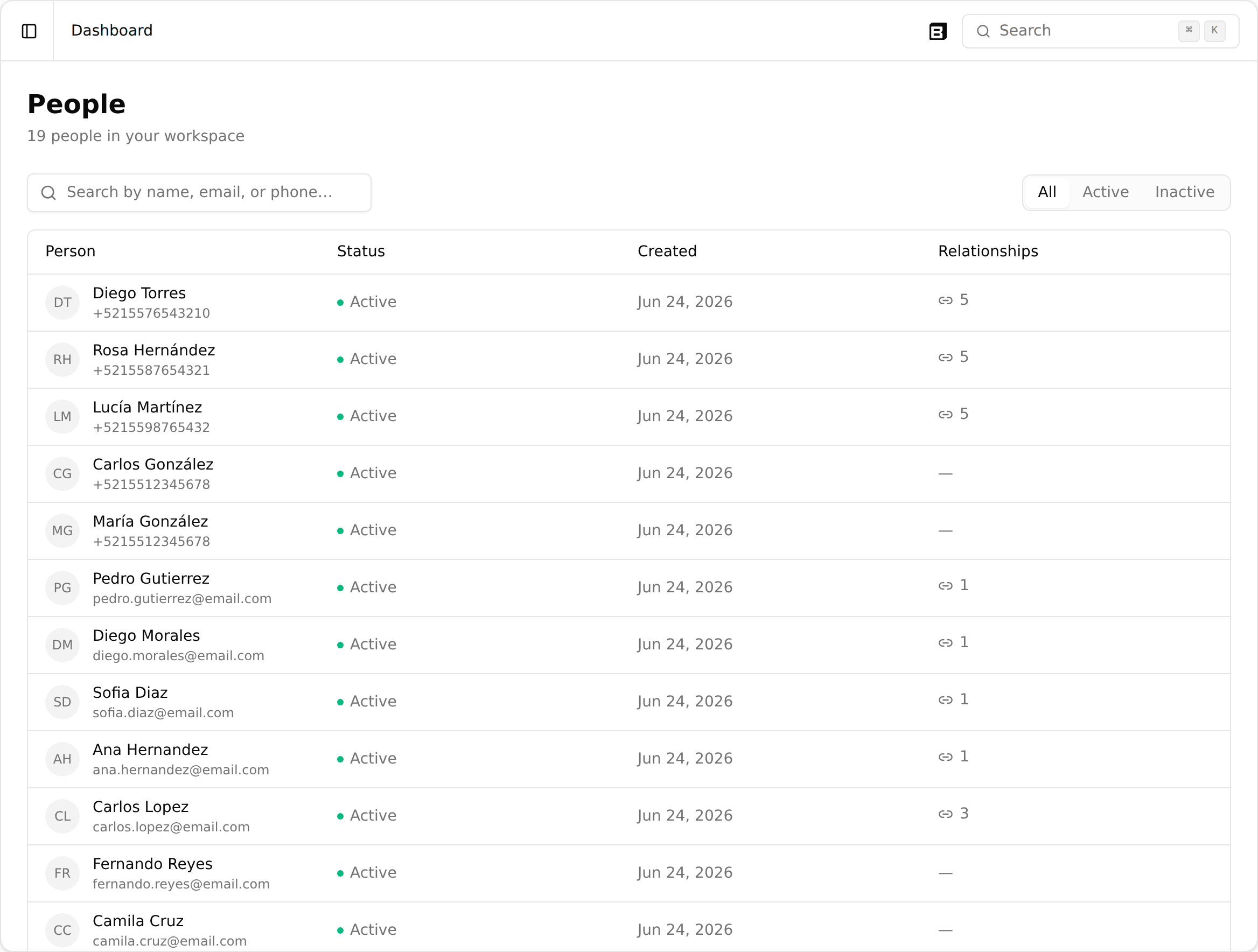
Look up people by any attribute in the directory

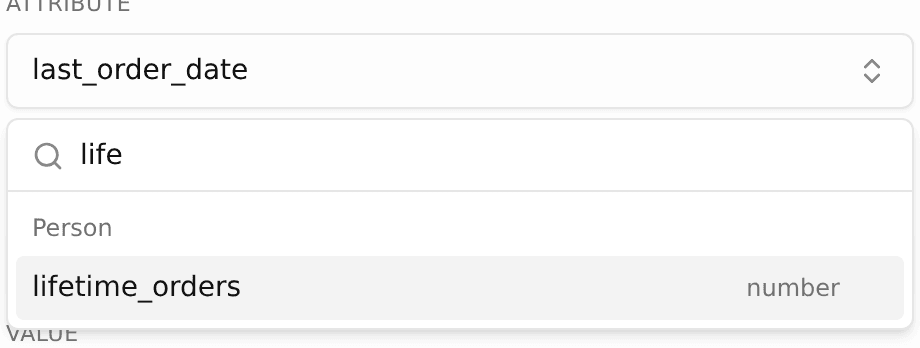
You can now filter the People directory by any attribute: pick a key from your organization's attribute catalog, type an exact value, and the list narrows to the people whose data carries it. This makes it easy to find a specific person by a field like an RFC, a tier, or a user type, even across very large directories.

Minor improvements

A few smaller improvements.

  • Conversations: improved reliability when a customer sends messages back to back, so the agent finishes its in-progress reply and still answers the next message instead of occasionally leaving it unanswered.
The initiatives list row menu open, showing the new Duplicate action

Duplicate an initiative to start your next one faster

You can now duplicate an initiative right from the list, using its row menu. The copy lands in Draft with your full setup (context, questions, success metrics) but zero participants, so you can adjust it and launch without rebuilding from scratch.

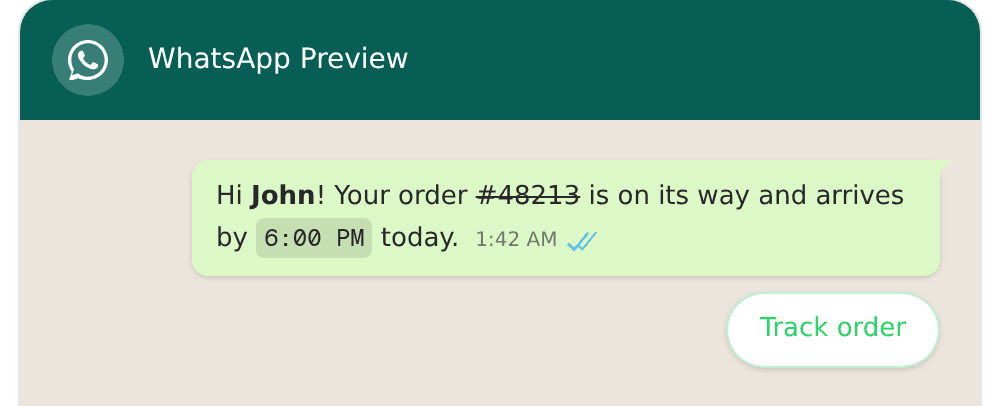
A WhatsApp template preview showing bold, strikethrough, and monospace formatting plus a quick-reply button

See exactly how your WhatsApp template will look

The WhatsApp template preview now renders real formatting (bold, italics, strikethrough, monospace, and lists), so you see exactly what your customers will receive instead of raw text. Buttons also now show up reliably while you're editing a template.

Minor improvements

A few smaller improvements.

  • Journeys: fixed a bug where a message-sending step could skip resending a WhatsApp message on a retry, so customers now reliably receive it even after a retry.

See which message and path drove each result

Journey analytics now shows per message and per path attribution, so your success metric is tied to the specific step and route that produced it instead of only the initiative total. A new attribution view in Routes shows how much each step contributed, and a Paths and outcomes section traces the route through the journey that earned the result, so you can see what is actually converting rather than just the aggregate.

Minor improvements

A few smaller improvements.

  • Segments: the segments list is now paginated, so large workspaces load faster and stay responsive instead of rendering every row at once.
  • Data and Variables: the Data and Variables sections are now available in every workspace, no longer limited to selected accounts, and the initiative sidebar is grouped into clearer sections.
  • Agent context: you can now give your agent a richer briefing, with the initiative context limit raised to 20,000 characters.

Minor improvements

A smaller improvement.

  • Data export: the data view export now includes the participant's phone number, so contact details come through alongside your exported results.
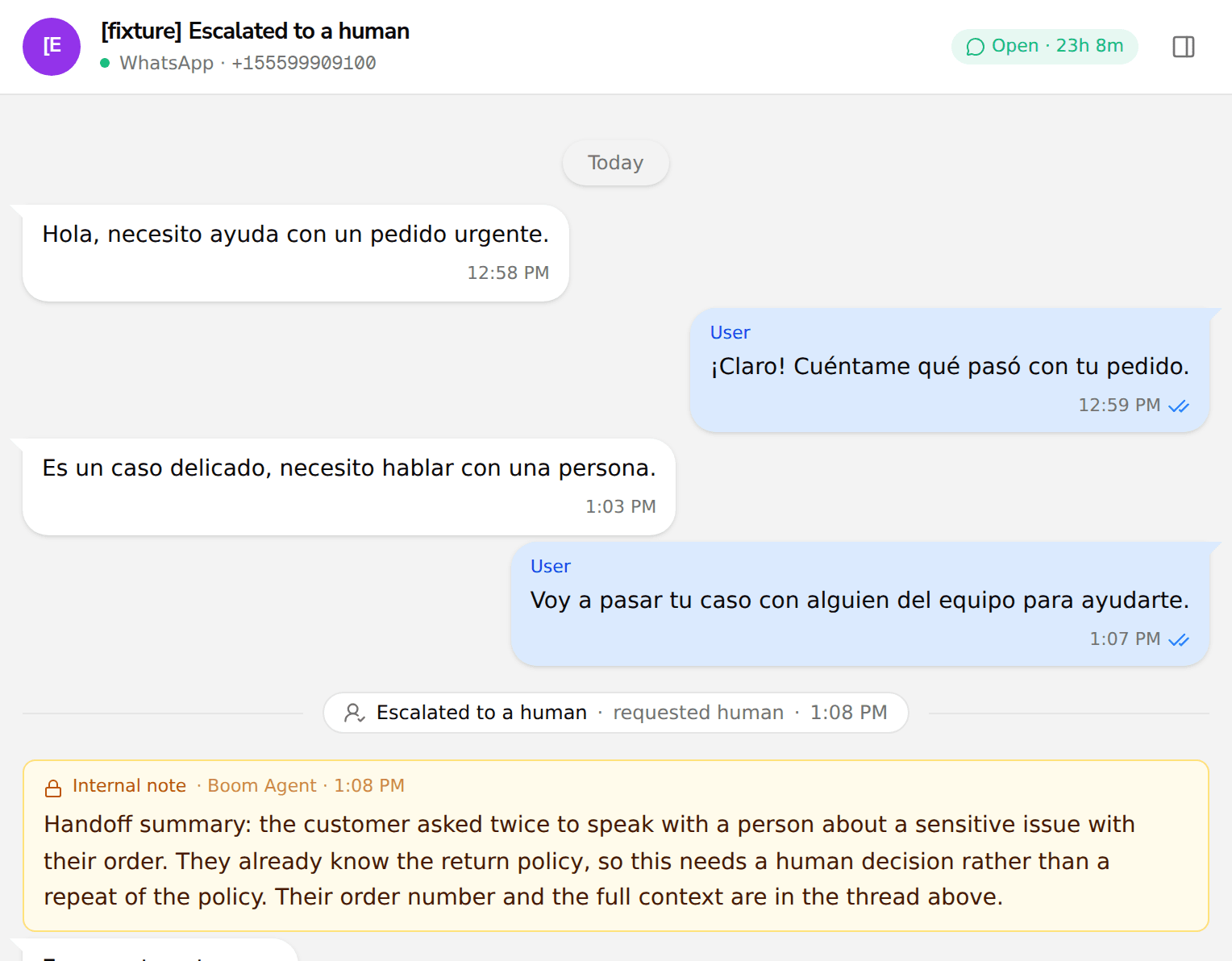
Inbox conversation thread showing an Escalated to a human marker above an amber internal note that summarizes the agent handoff

See when the agent hands a conversation to a human

When the AI agent escalates a conversation to a person, the inbox now shows an internal note summarizing the handoff right in the thread. Your team can see that the escalation happened and why, without digging through other tools.

Include order and shipping details in your messages

Your messages can now pull data from related records like orders and fulfillments, so a WhatsApp message can include the tracking number, order status, or shipping details directly. Before, a journey could filter on that data but not print it, which left blanks in the message; now the value resolves across the full path from contact to order to fulfillment.

Segment on the absence of a relationship

Segments can now filter on the absence of a relationship, not only its presence. Build audiences like people with no completed checkout or no order in the last month, which makes abandoned cart and win back campaigns straightforward, and a negated condition can now carry its own filters for finer targeting.

Minor improvements

A few smaller improvements.

  • Leave without saving: the prompt that appears when you leave a journey with unsaved changes now has a clear exit button, so it is obvious how to discard and go.
  • Journey decision node: the decision step now renders and lets you edit every condition value correctly, including the shapes that previously showed blank.

Trigger journeys on Shopify shipping and payment events

Boom now ingests Shopify fulfillments and order transactions as first-class data. You can build segments and trigger journeys on what actually happened to an order: message a customer when their order ships, chase an expired or failed payment, or follow up after a refund. It works on your existing Shopify connection with no new permissions, and covers your stores right away.

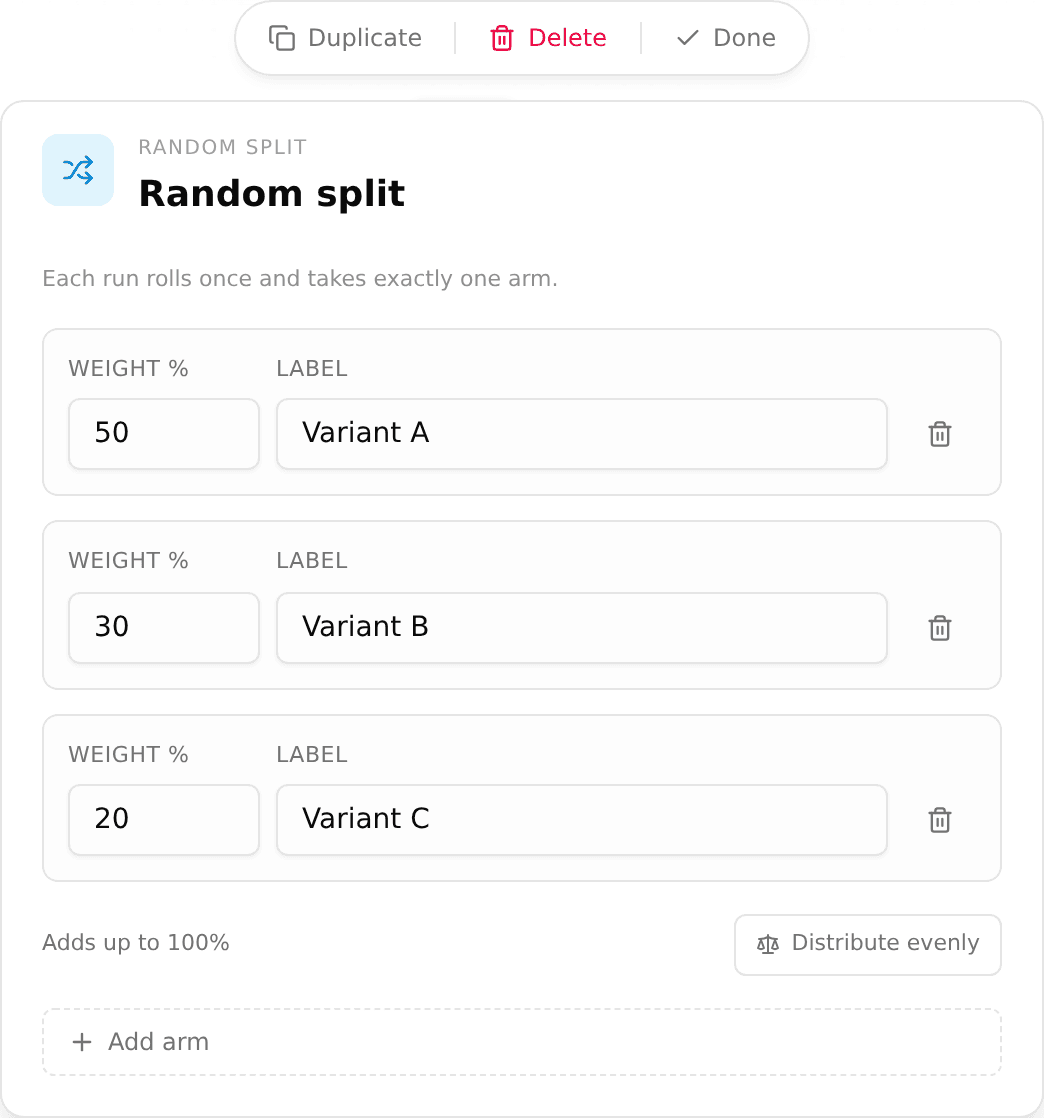
The Random Split node editor in the journey builder, showing three weighted arms that add up to 100 percent: Variant A at 50, Variant B at 30, and Variant C at 20

A/B test inside a journey

The new Random Split node lets you A/B test inside a single journey. Add it to the canvas, give each branch a share of your audience, and send different openers, delays, or agent modes to each group without publishing separate journeys or splitting your list by hand. Every contact is assigned once and stays on their branch even if a step retries, so the comparison stays clean. Per-branch results are coming next.

Never lose unsaved work in the journey builder

Leaving the journey builder with unsaved edits now stops to ask before anything is lost, with a clear Save and leave or Keep editing. A stray click to the sidebar or a closed tab no longer discards a journey you were still working on.

Minor improvements

A few smaller improvements.

  • Reply counting: a reply the agent holds back is no longer recorded as a dropped message, so your delivery and reply stats reflect what actually happened.
  • Links in the inbox: tracked links now resolve to their real destination on the path the inbox reads, so they open correctly when you click them.

Undo and redo in the journey builder

The journey builder now supports undo and redo on the canvas. Press Ctrl+Z to step back and Ctrl+Y to step forward through your edits, so an accidental change or a deleted node is one keystroke away from being restored instead of rebuilt by hand.

Minor improvements

A few smaller improvements.

  • Test phone numbers: add a test number with a country selector so it is never malformed, and test numbers now expire and are managed from Settings.
  • Initiative tester: the tester now shows what a customer actually receives (media, footer and buttons) and reports honestly how many steps of the journey it covered.
  • Message formatting: cleaned up stray commas and flattened lists that could appear in some outbound messages.
  • Tidy your journey canvas: large journeys now arrange into a clean, straight layout, and a new Tidy action re-flows the canvas whenever it gets messy.
  • Invalid nodes flagged on the canvas: a misconfigured node, or a message node whose template variables are not set, is now marked right on the canvas instead of a generic banner, so you catch it before publishing.
  • Clearer handling of files and documents: when the agent receives a file it cannot read, it now names the file type and size, and it reports how many pages a document has instead of guessing.

See why a message did or did not reach a customer

The new Message Logs page lists every message with its delivery status and the reason a send failed, and lets you search by recipient, so you can tell why something did not arrive without asking engineering. Delivery status is more accurate too, because out of order provider callbacks no longer roll a delivered message back to an earlier state.

Outbound webhooks for journey events

You can now subscribe to outbound webhooks and be notified when a journey run starts, when it ends (with the reason, such as a node failure, a cancellation or a timeout), and when an enrollment is rejected. Webhook URLs support environment variables and resolve their own credential per environment, and you can send a test ping without launching a journey.

Export a conversation as a PDF

You can now export a conversation as a PDF from the shared inbox. Pick the time range you want, and the export leaves out internal agent notes so the document only shows the customer-facing exchange. It is handy when you need a clean, shareable record of a conversation, for example to show a payment processor that an exchange actually took place.

The agent remembers what a customer already answered

The agent no longer asks a customer again for something they already told it. It now reads the answers captured earlier in the conversation, so replies pick up where the customer left off instead of repeating questions.

Stop, pause, and resume a live campaign

You can now stop, pause, and resume a running campaign directly. Stopping retires a campaign so it takes no new contacts, without having to publish a replacement. Pause holds a campaign and resume picks it back up later. In every case, conversations already in progress finish on their own. The controls are available in the builder, on the initiative, and through the API.

Minor improvements

A few smaller improvements from today.

  • WhatsApp template headers: upload an image straight from your computer for a template's media header, instead of only pasting a URL.
  • Journey Analytics speed: the analytics dashboard loads much faster on high-volume initiatives, with the same numbers.
  • Navigation: the main menu is reorganized into clearer sections (Initiatives, Shared Inbox, Customer Data, and settings), with usage now at the top level.
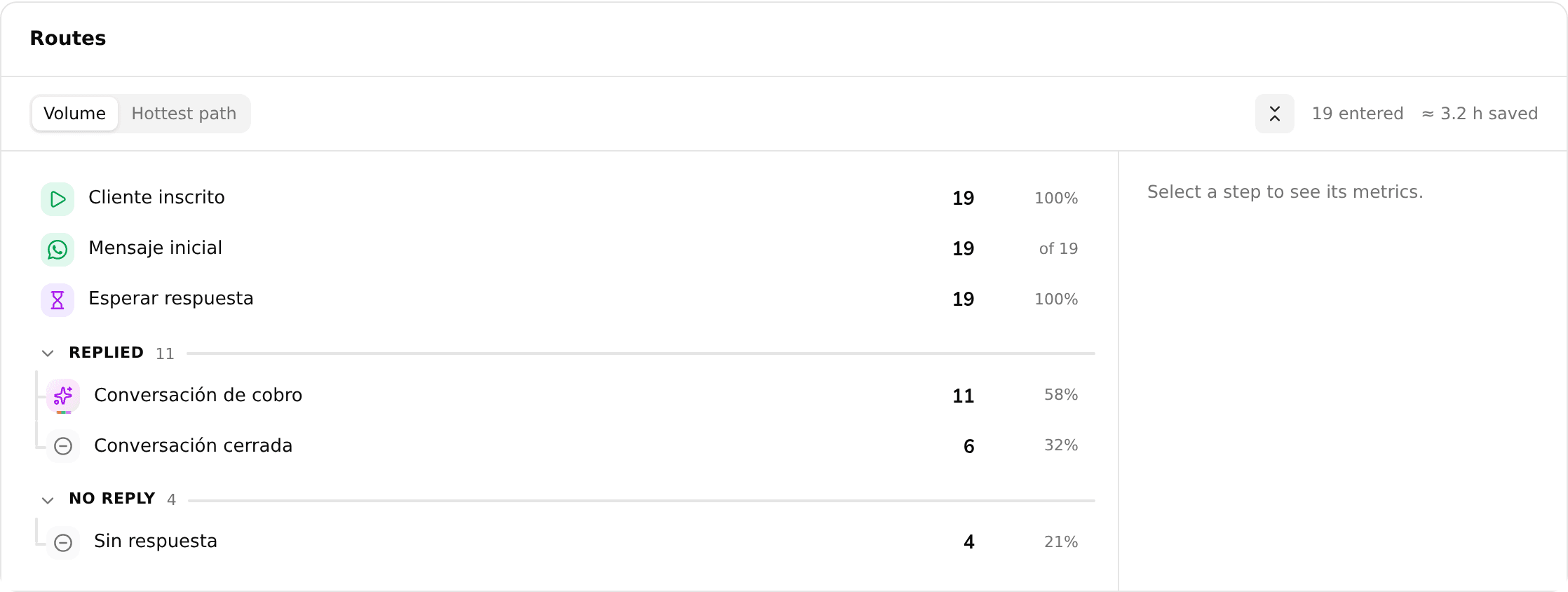
Routes outline showing a journey's trunk, a REPLIED branch with a conversation and closed-conversation step, and a NO REPLY branch with a no-response step, each with run counts and percentages

See a journey as an outline with Routes

Routes is a new view inside Journey Analytics that reads a journey as an outline instead of a diagram: one row per step, with branches indented under the split that creates them, run counts on each branch, and an estimate of the operational time each step saved. It also counts how many AI messages were sent at each step, and shares the version and date filters you already have set on the dashboard.

Trigger a segment on a recurring cadence

Segments now support is between, a new date operator that matches a sliding window, like more than 90 and less than 97 days ago, instead of a fixed calendar range. Because the window moves forward every day, a segment built on it can enroll the same person again and again on a set cadence, for example re-surveying customers every 90 days instead of only once.

Cart recovery for Shopify journeys

Build cart recovery journeys for your Shopify store. The products a shopper left in their cart and your checkout domain are now available as journey variables, so you can message customers about the exact items they abandoned and send them straight back to checkout.

Minor improvements

A few smaller improvements from today.

  • Journey analytics polish: switch charts between counts and values, funnel step percentages are now accurate, and the KPI cards and their change indicators are easier to read.
  • Large audiences: segments now evaluate reliably for very large contact bases and report an exact size instead of stopping at 100,000.
  • Bulk transcript export: a new API endpoint returns all of an initiative's conversations in pages of up to 100.

Multiple success metrics for journey analytics

Measure a journey with more than one success metric, each with its own name and aggregation (count, sum, average, or max). Attribution now starts from the first outbound message so replies across WhatsApp and email are counted correctly, a value metric can pull its amount from a linked record such as an order total, and you can filter results by journey version to compare performance before and after a change.

Minor improvements

A few smaller improvements from today.

  • API-launched initiatives: launching an initiative through the API now enrolls participants and starts sending, instead of leaving the journey in draft.
  • Conversation wait status: a journey conversation node now shows why it is still waiting and when it will close, instead of an opaque running state.
  • Done view in the shared inbox: the Done view no longer shows conversations that are no longer assigned to you.

Minor improvements

A few smaller improvements from today.

  • Conversation export in Data View: the export button in Data View now opens the full export menu (CSV, Excel, and transcripts) for your conversation data.
  • Attachments in the sidekick: paste or drag and drop images and PDFs straight into the sidekick composer.
  • Template preview in the sidekick: the sidekick's draft card now shows a real WhatsApp message preview instead of raw fields.
  • Free-text inactivity timeout: set a journey conversation node's inactivity timeout as free text, with sensible minimum and maximum bounds.
  • Conversations in the initiative sidebar: the Conversations view is now reachable directly from the initiative sidebar.

Staging and production environments for journeys

Run one journey against different environments. Set per-environment values with {{env.*}} (for example a different baseUrl for staging and production), and have an HTTP Request node authenticate with the secret that matches the journey's pinned environment. Test a journey against staging, then switch it to production, without duplicating the journey or editing each node.

Minor improvements

A few smaller fixes from today.

  • Template creation: creating a template no longer fails with a "Couldn't apply" error when a placeholder is missing an example value.
  • Cleaner agent messages: fixed cases where line breaks showed as raw <br> and where list bullets could be dropped from a reply.
  • No cut-off replies: agent responses no longer get truncated at the end of a list when handed off between steps.

Minor improvements

A couple of smaller fixes from today.

  • Campaign funnel counts every reply: the Replied stage now includes replies from conversation steps, not only steps that explicitly wait for a reply, so the funnel reflects real engagement instead of showing zero when customers did respond.
  • Send Message variable picker: choosing First name in a message template no longer also selects the full customer name, so each placeholder maps to exactly the field you picked.
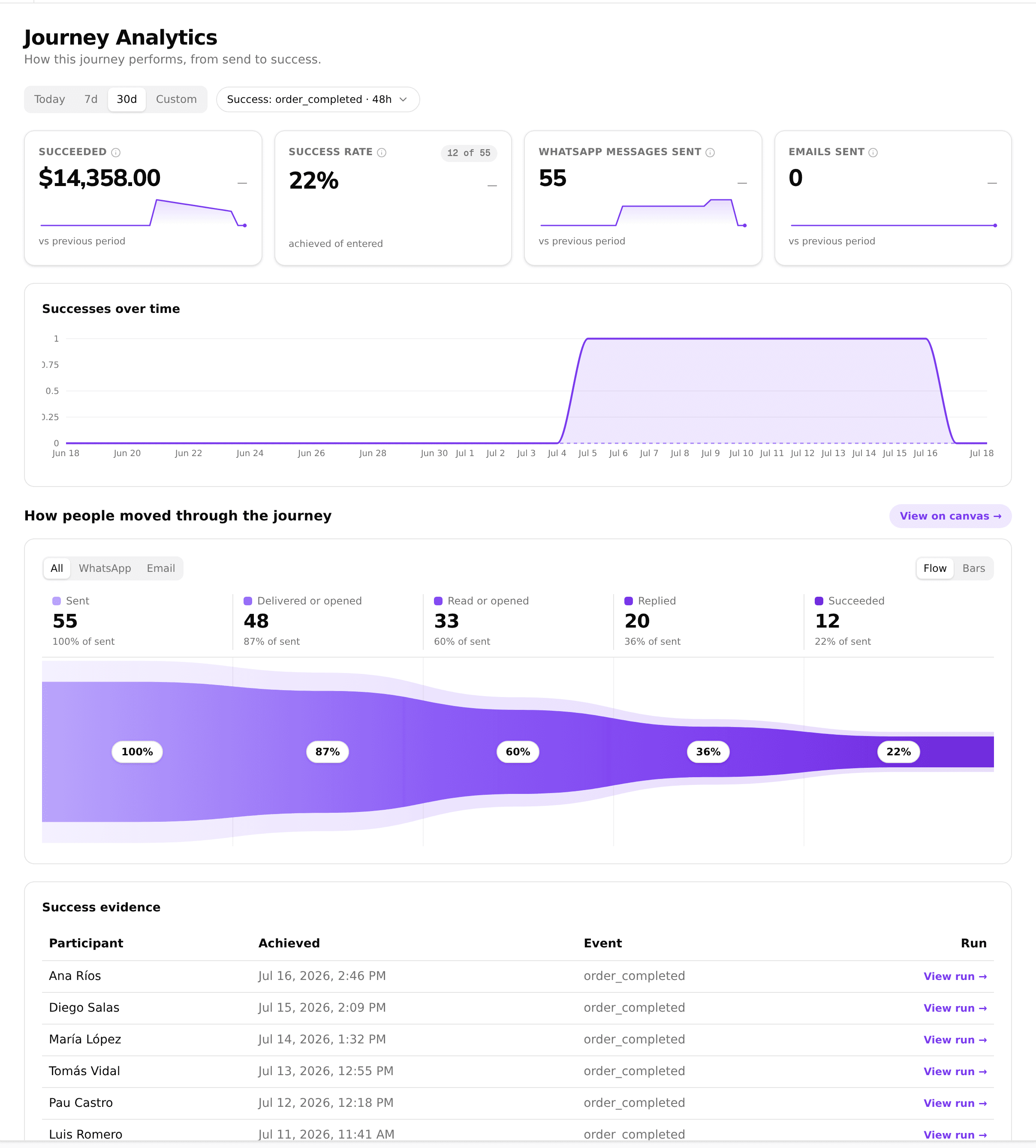
Journey Analytics dashboard with the reach to reply funnel, KPI cards, and a configured success metric

See how each initiative is performing with Journey Analytics

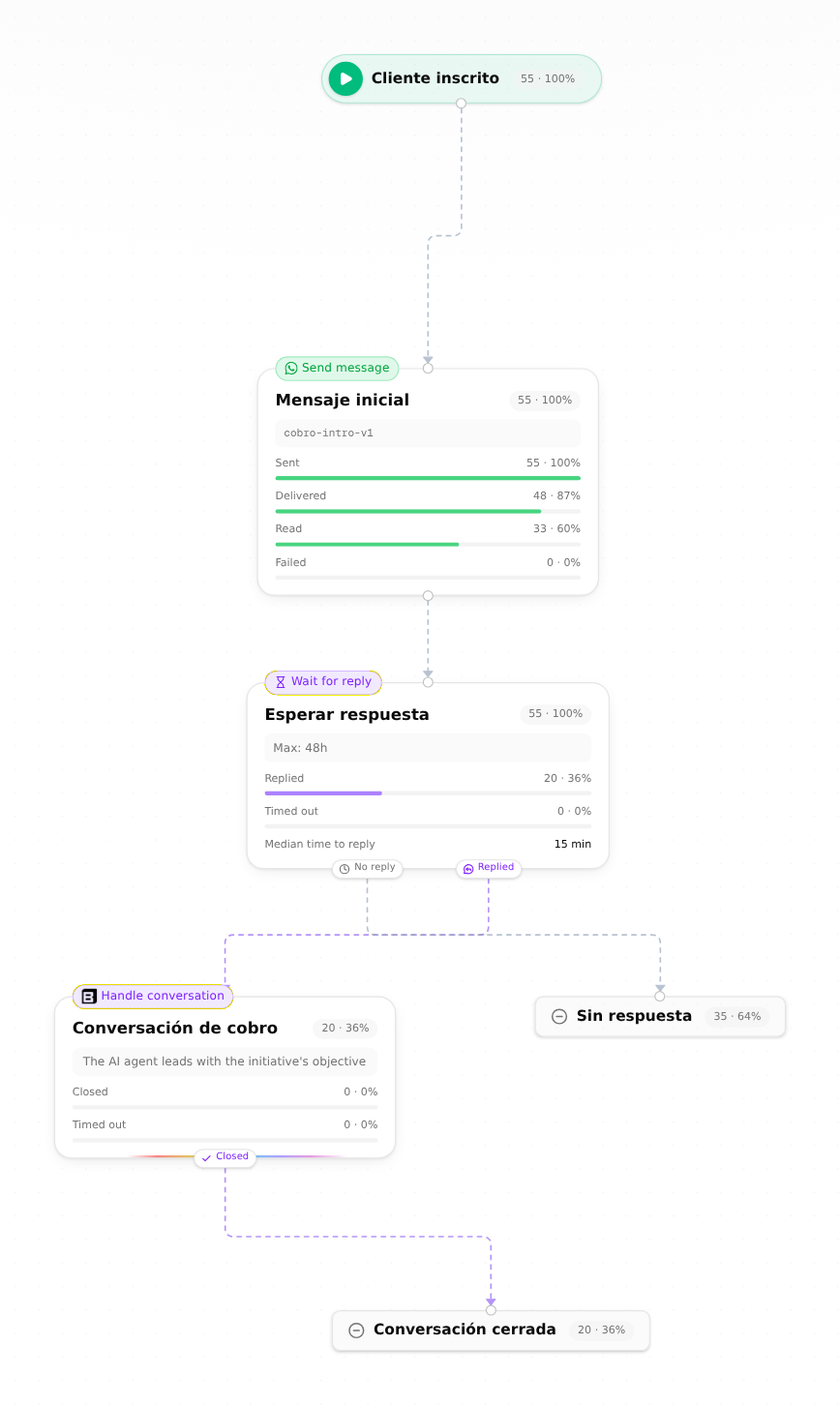
Every initiative now has a Journey Analytics dashboard that shows how a campaign is doing from end to end: a reach to reply funnel for each channel, KPI cards for messages sent and delivered, and a configurable success metric so you can define what counts as a win (a sale, a booking) and then see the success rate, the value generated, and the evidence behind each one. You can also open the journey map to read delivered, read, and reply counts on every node.

Journey map with per-node delivery and reply metrics overlaid on each step

Minor improvements

A few smaller improvements from today.

  • Segment by when a contact was created: a contact's creation date is now a date attribute you can filter on in segments, so you can target people added in the last 30 days (or any window) from the builder, the API, and the sidekick.
  • Clearer warning when a tested response has many fields: the Send Message, Send Email, and Dispatch field pickers now tell you when a tested body's field list is incomplete, instead of implying that a missing field does not exist.
  • Fixed the Configure email link on journeys: the "Configure email" button on a Send Email readiness step now opens the right settings page instead of a broken link.

Minor improvements

A few smaller improvements from today.

  • Pick nested response fields in more journey nodes: the Send Message, Send Email, and Dispatch pickers can now bind to a specific field inside an HTTP node's response, not just the whole body, matching what the Decision and Case nodes already offered.
  • Message variables when authoring by API or agent: building a journey through the API or the agent now exposes the same catalog of message template variables the visual picker uses, and publishing is blocked when a Send Message step points at a variable that would not resolve, so messages no longer go out with a blank spot.
  • Renamed contacts show everywhere: renaming a contact in the inbox now updates their name across the list, header, search, and live updates, instead of only in the context panel.
  • Add identity stays available in the inbox: the option to add an identity no longer disappears after the first one when a contact has only linked profiles, so you can keep attaching identities.

Send customer documents to your own systems from a journey

Journeys can now forward documents a customer sends over WhatsApp (IDs, payment receipts) to your own systems. The new engagement.documents variable resolves to secure, time-limited file links inside an HTTP Request node, so a journey can hand those files straight to your API. The agent also detects password-protected PDFs so they are handled cleanly.

Use extracted conversation data in your journeys

The data your agent extracts from conversations can now be used as journey variables. Reference an extracted field inside a journey (in a condition, a message, or an HTTP request) and the value flows through automatically, so what a customer tells the agent can drive what happens next.

Add extra phone numbers and emails to a contact

Operators can now add extra phone numbers and emails to a contact directly from the shared inbox, so a customer who writes in from a second number still resolves to the same person. Contact matching also got more reliable for numbers written with or without the extra Mexico country-code digit.

Minor improvements

A few smaller improvements from today.

  • Organization switcher in the shared inbox: operators who work across several organizations can now switch between them right from the inbox sidebar.
  • Preview your sources: data sources now open in a preview modal and show up in the sidebar, so you can check what you connected without leaving the page.
  • Easier HTTP node authoring: the journey HTTP Request node now auto-quotes JSON values, validates the body inline, and ships with sample payloads.
  • Simpler edge connections in the builder: connecting two journey nodes now snaps to the nearest handle, so you no longer have to hit the exact dot.
  • Cleaner add-data flow: the add-data wizard waits until you save before creating anything, so abandoned setups no longer leave stray resources behind.
  • Publish guardrail for extracted variables: publishing a journey now warns you when a step uses an extracted field that has no conversation to fill it, before it comes back empty.

The Concierge reads your PDF attachments

When a customer sends a PDF over WhatsApp, like a bank statement or a form, the Concierge now reads its text and can use it in the conversation and in your reports. If the file is password-protected, the agent recognizes that instead of treating it as unreadable, so it can ask for an unlocked copy.

A self-serve Sources page for your data

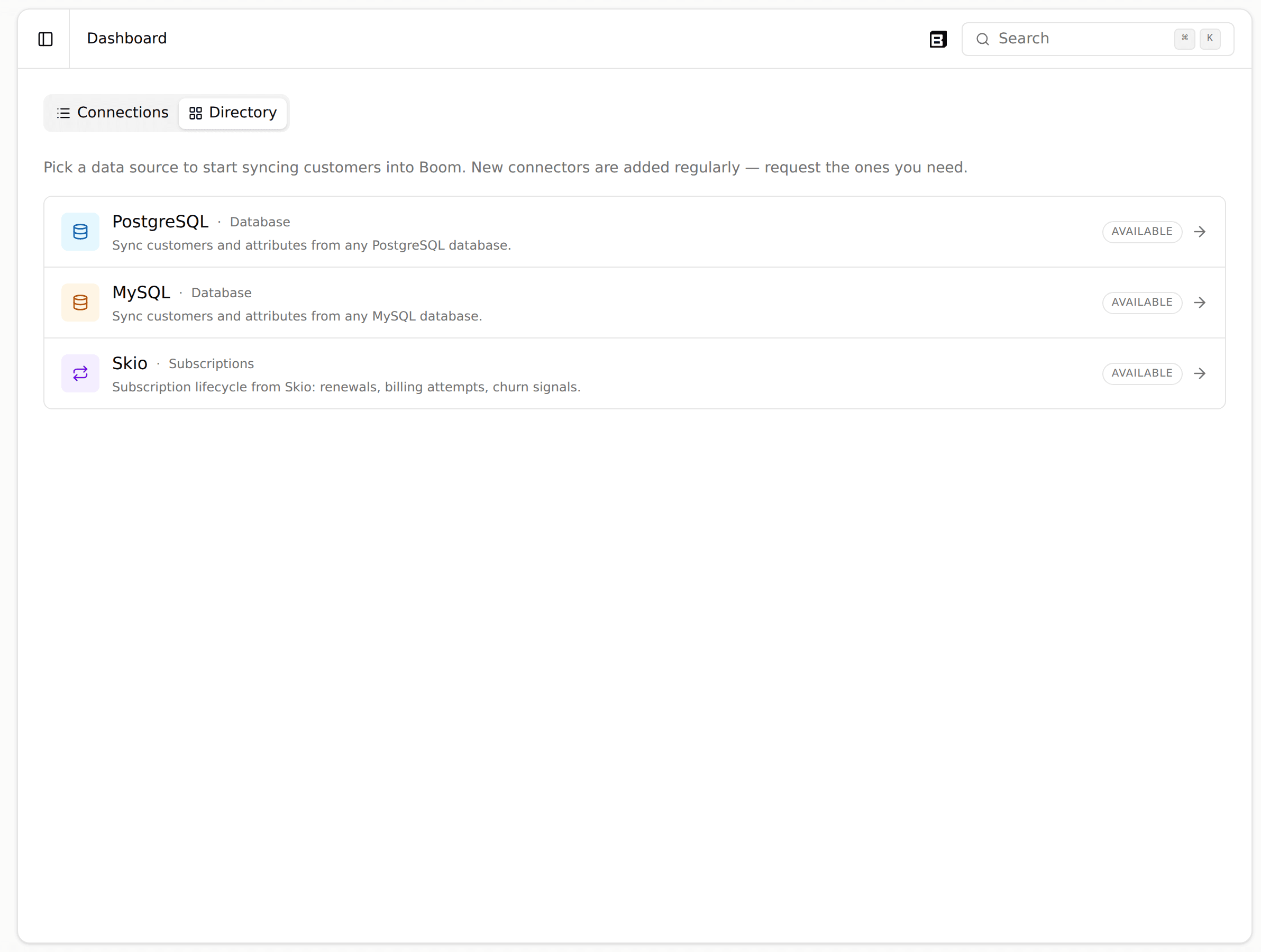
The Sources page now covers every integration, your database, Shopify, and Skio, in one place, so you can view and edit your own sync queries without looping in a Boom engineer.

Minor improvements

A few smaller improvements from the last few days.

  • Higher API rate limits: public API keys can now make up to 1,000 requests per minute, up from 100, so heavier integrations stop hitting the ceiling.
  • Accurate segment member counts: segment lists and detail pages now show the real, live number of active members instead of a count that could lag behind.
  • Fully translated journey builder: labels, toolbar actions, and validation messages in the journey builder now follow your language instead of showing Spanish regardless of locale.
  • Journey run history over the API: you can now read a contact's step-by-step journey run, which nodes ran and whether they succeeded, over the API and MCP.

A drag-and-drop email builder

The new email builder lets you design branded emails visually: drag in logos, headings, text, buttons, images, dividers, and footers, insert {{variables}} inline, and manage your own image library. Emails render with email-safe HTML so they look right in every inbox.

A richer view of your extracted data

The extraction Data View got more analytical: numeric fields now show total, median, and range, you can export the data to CSV, and you can click a quote to open the exact conversation it came from. It is easier to trust and act on what the agent extracted.

Segments that update the moment data changes

Segments can now update reactively: when a person's data or events change, their segment membership updates right away instead of waiting for a scheduled sweep. Journeys triggered by a segment enroll people the moment they qualify.

Send emails from a journey

Journeys now include a Send Email node, so an automated flow can reach someone by email the same way it does over WhatsApp. Point the node at a published email template and it sends with each recipient's real data.

Minor improvements

A few smaller improvements from the last few days.

  • Extraction schema over the API: you can now read and set an initiative's data-extraction schema programmatically over the API and MCP, not just field by field in the builder.
  • Attribute distributions in the sidekick: the operator sidekick can summarize how a person attribute is distributed across your audience, with personal data kept safe.

Export your contacts to CSV or Excel

From the contacts table you can now download your contacts as CSV or Excel, either the rows you have selected or every contact matching the current view and search. The export always includes every extraction field, even columns hidden by the column picker, so you get the complete data no matter how the table is arranged.

Build and edit journeys from the API, MCP, and Sidekick

You can now author a complete journey without touching the builder canvas. The new write surface lets you create, edit, validate, and publish an entire journey (every node type and every connection) from the public API, MCP, and the in-app Sidekick. Build a flow by describing it in chat, fork a live journey into a draft, or manage your journeys straight from your own tools.

Minor improvements

A few smaller improvements from today.

  • Multi-select list fields: extraction schemas now support a closed-list field that accepts several values, so answers like abandonment reasons stay consistent instead of drifting into free text.
  • Cleaner responses view: the Respuestas tab groups its data sources into a single stacked pile and lays its charts out in an adaptive two-column grid.
  • CSV import preview now stays neatly inside its dialog instead of overflowing the table.
  • Friendlier empty state: the Initiatives screen shows an animated illustration when there is nothing yet.
  • Clearer errors when a Sidekick draft cannot be saved, now showing the real reason instead of a generic message.
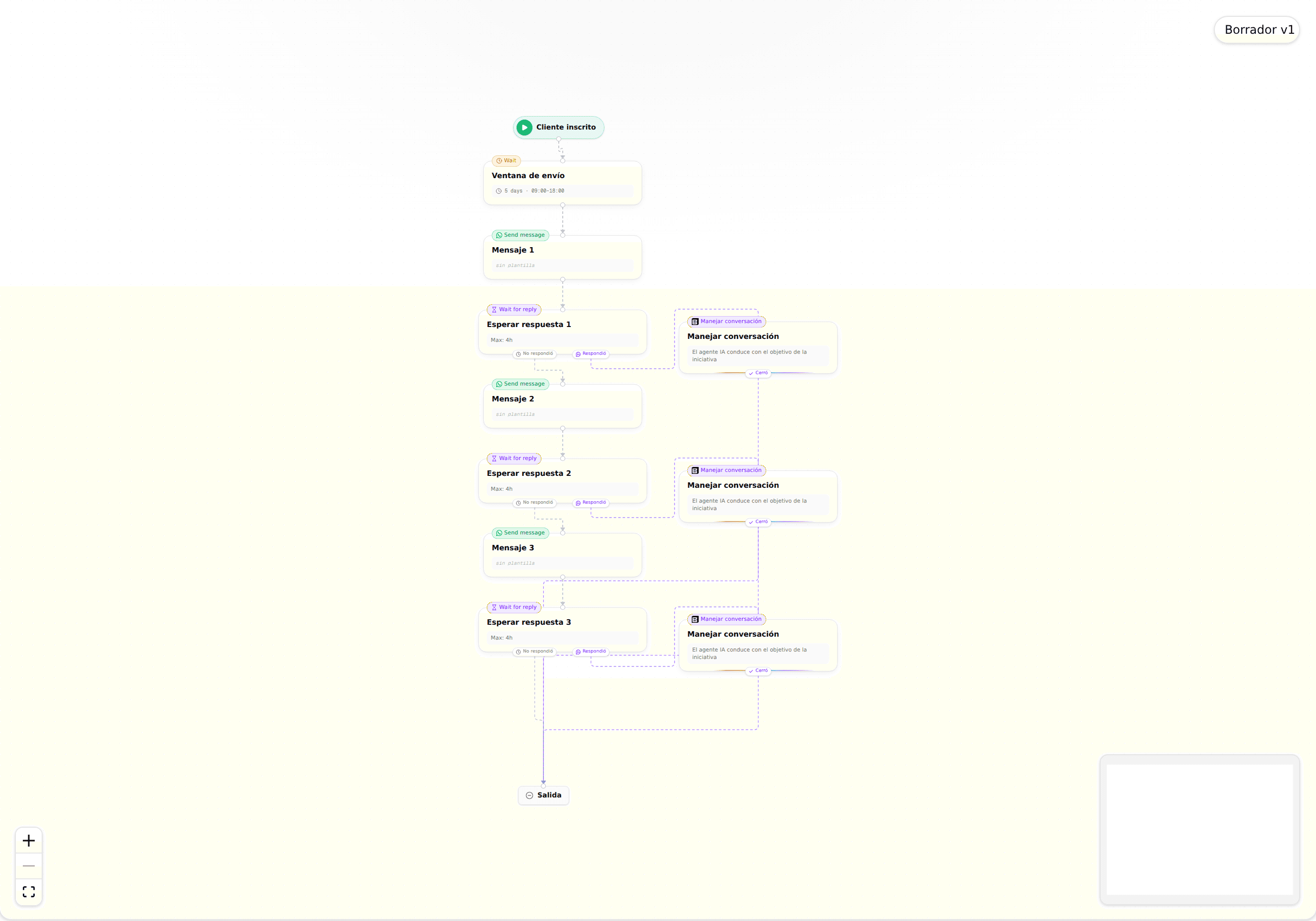
The journey builder canvas showing an automated flow with enrollment, send window, message, wait for reply, and manage conversation nodes connected top to bottom

A cleaner journey builder canvas

The journey builder got a visual refresh: a cleaner canvas with clearer node cards and more helpful editing affordances. Building an automated flow (enrollment, send windows, messages, wait for reply branches, and AI managed conversation steps) is now easier to read and lay out.

Launch and manage more of Boom from the public API and MCP

You can now do more than read from the public REST API and MCP server. Launch research Initiatives, create and manage Segments, and add, list, and stop Participants, including pulling a participant's full conversation transcript. Journeys are now readable through the API too. Every action runs on the same definition behind the API, the MCP tools, and the product, so your own systems and agents stay consistent with what you see in the app.

Minor improvements

A few smaller improvements from this week:

  • Abandoned cart reach: contacts who have a phone number but were showing as unreachable are now correctly matched to WhatsApp, so more of your abandoned cart customers actually get your messages.

Clearer journey blocks for waiting and conversations

The visual journey builder now splits waiting and talking into two dedicated blocks. Wait for reply pauses a journey until the customer responds, and Handle conversation is a first-class card your AI agent uses to hold a back and forth toward a goal. You can expand and edit a block in place and drag it to reorder, so building a multi-step flow is clearer and faster.

A guided wizard for creating initiatives

Creating an initiative is now a guided four-step wizard: set it up, configure the agent, choose what data to extract, and shape the journey. Each step keeps the choices in front of you, so you can launch a research or outreach initiative with confidence and step back to adjust anything before you go live.

Minor improvements

A few smaller improvements from the last couple of days.

  • Editable customer details: edit a customer's name right in the inbox, and your change overrides the synced data everywhere the agent uses it.
  • Simpler WhatsApp templates: message templates are now managed with just your phone number, no technical account identifier needed.
  • WhatsApp location shares now render as a shared location instead of a blank bubble, and your AI agent can read them too.
  • Richer CSV uploads: every column in an uploaded CSV is captured as a customer attribute, and the upload wizard asks for an ID column so contacts match cleanly.
  • Clearer journey conditions: boolean decision steps now use a simple True or False selector, and an unset condition is caught before you publish.
  • The dashboard now follows your light or dark theme.

Clearer building blocks for outbound journeys

The journey builder now uses clearer building blocks so it is easier to see what each step does. The old Conversation step becomes Wait for reply, a new Handle conversation block lets you choose whether AI or a human takes over, and the confusing send-immediately toggle is replaced by an explicit send-window step. Building an outbound journey now reads the way it runs.

A cleaner metrics dashboard with more accurate response rates

The Metrics dashboard has a refreshed layout with a new funnel overview, softer sentiment colors, and clearer labels, so your results are easier to read at a glance. Response rate and the conversation funnel now count real inbound replies, so the numbers reflect what actually happened.

A clearer view of your initiative metrics

The metrics view got a rework that makes results easier to read at a glance. A new funnel shows how contacts move through each stage, the response rate and funnel are now based on real inbound messages, and the layout, colors, and labels are cleaner so you can spot what is working faster.

Minor improvements

A few smaller improvements from today.

  • Contact uploads now capture every column in your file as a person attribute, so no data from your upload is left behind.
  • The contact upload wizard now asks for an ID column, so records reconcile cleanly instead of creating duplicates.
  • Journey decision conditions now use a clear True/False selector and can no longer be published while left unset.

Honor opt-outs automatically with the Do Not Contact list

You can now maintain a Do Not Contact list per organization from the new dashboard under People, so opted-out contacts are never messaged again by mistake. A contact is added automatically when they reply STOP, use the one-click unsubscribe link in an email, or is added manually, and every outreach campaign, journey message, and automated follow-up checks the list before sending. A team member can still send a message by hand when it is truly needed, with a clear warning and a permanent audit log, and the dashboard now supports search and pagination to keep long lists easy to manage.

Minor improvements

A few smaller improvements from today.

  • WhatsApp replies from your AI agent now arrive faster, thanks to a streamlined reply pipeline.
  • The segments builder is denser and easier to scan, with a cleaner header and no more horizontal scrolling on smaller screens.
  • Your AI agent can now see images customers send in a conversation, not just read the text, so it responds with the full picture in mind.

Minor improvements

A few smaller improvements from today.

  • Journeys can now branch on any event property, not just the reserved set, so decision and case steps react to the full detail of your custom events.
  • Reports now hide cards that have no data (like reward eligibility when no reward is configured), so the view stays clean and shows only what is relevant.
  • The journey builder node editor is now fully localized, so the controls read in your language throughout.
  • Revenue figures are more accurate: discounts that are already used up no longer count against net amount.
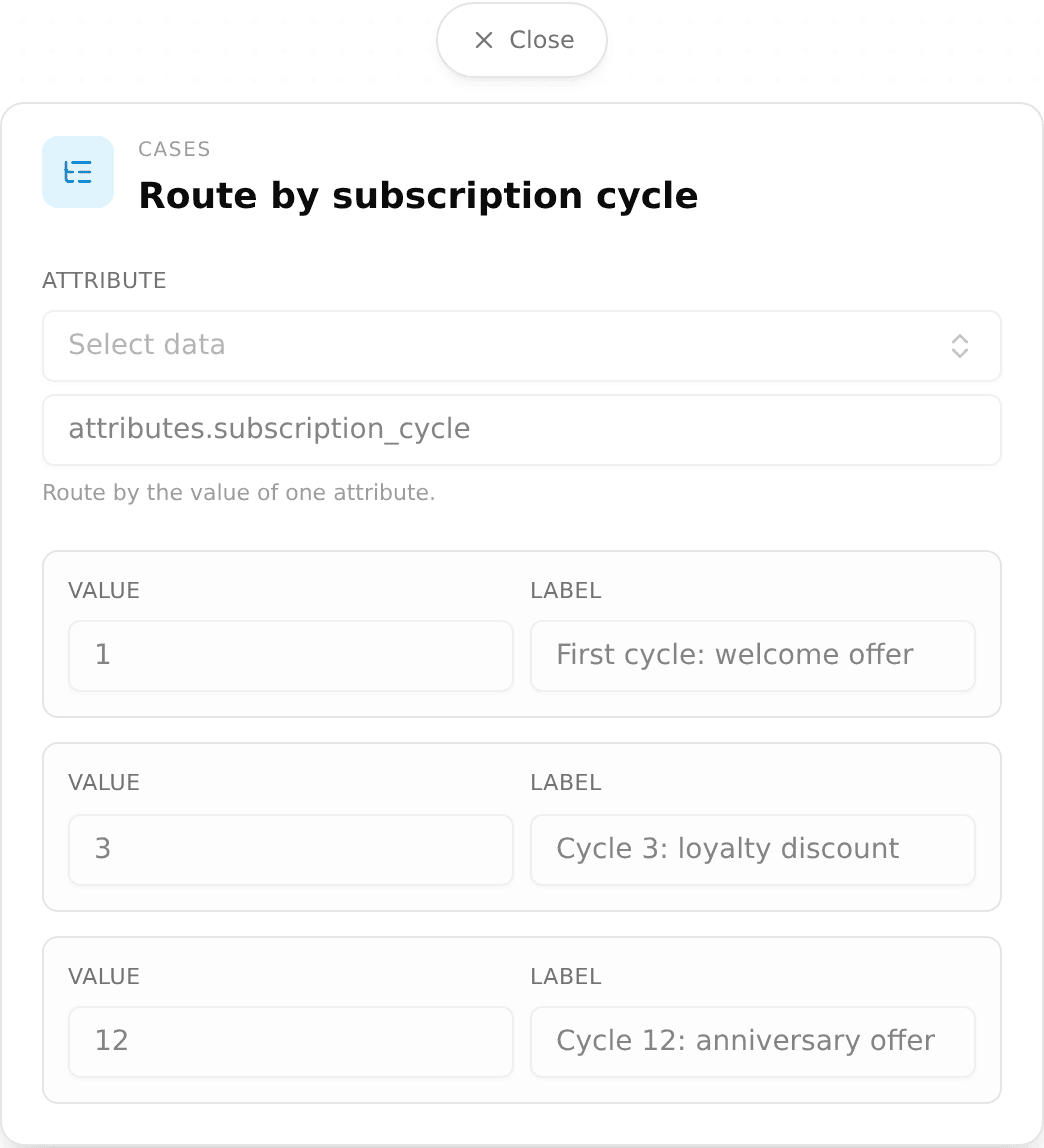
The journey builder Case node editor showing multi-way branching on a subscription-cycle attribute, with three labeled outcomes

Branch a journey many ways with the Case node

You can now add a Case node in the journey builder to route people down many paths based on a single attribute value, instead of chaining several decision steps. Each branch has its own outcome and there is a required default, so everyone lands somewhere and no one silently falls through.

Configure your agent per channel

You can now configure your agent per channel from a new settings screen: pick a default agent, toggle AI on or off, and set the namespace for each channel independently, with a fallback to your organization defaults. WhatsApp and web chat can behave differently without extra setup.

Create and manage Initiatives and WhatsApp templates via the API

The public REST API and MCP server can now create and manage your research Initiatives, not just read them: create a draft, update it, cancel or archive it, and link a WhatsApp outreach template to an initiative. You can also create, list, and check the approval status of WhatsApp templates, so you can run campaigns end to end from your own systems.

Let the assistant draft your email templates

The in-app assistant can now draft a complete email template from a simple chat prompt, filling in the copy and the right customer variables for you. Describe the email you want and start from a working draft instead of a blank canvas.

Minor improvements

A few smaller improvements from today.

  • Email templates now show variable chips consistently everywhere, and a bug that sent a raw token instead of the value is fixed.
  • You can now publish or unpublish an email template, and the send-test button shows a loading state so it no longer looks stuck.
  • New themed starter templates give you image-forward, styled emails to begin from, with variables available in the subject line.
  • The engagement detail view has a new Data tab, so you can see a person's context and workflow state at a glance.
  • Funnel and coverage numbers in reports now use honest denominators and rounded, attributed cards, so the figures you show match reality.
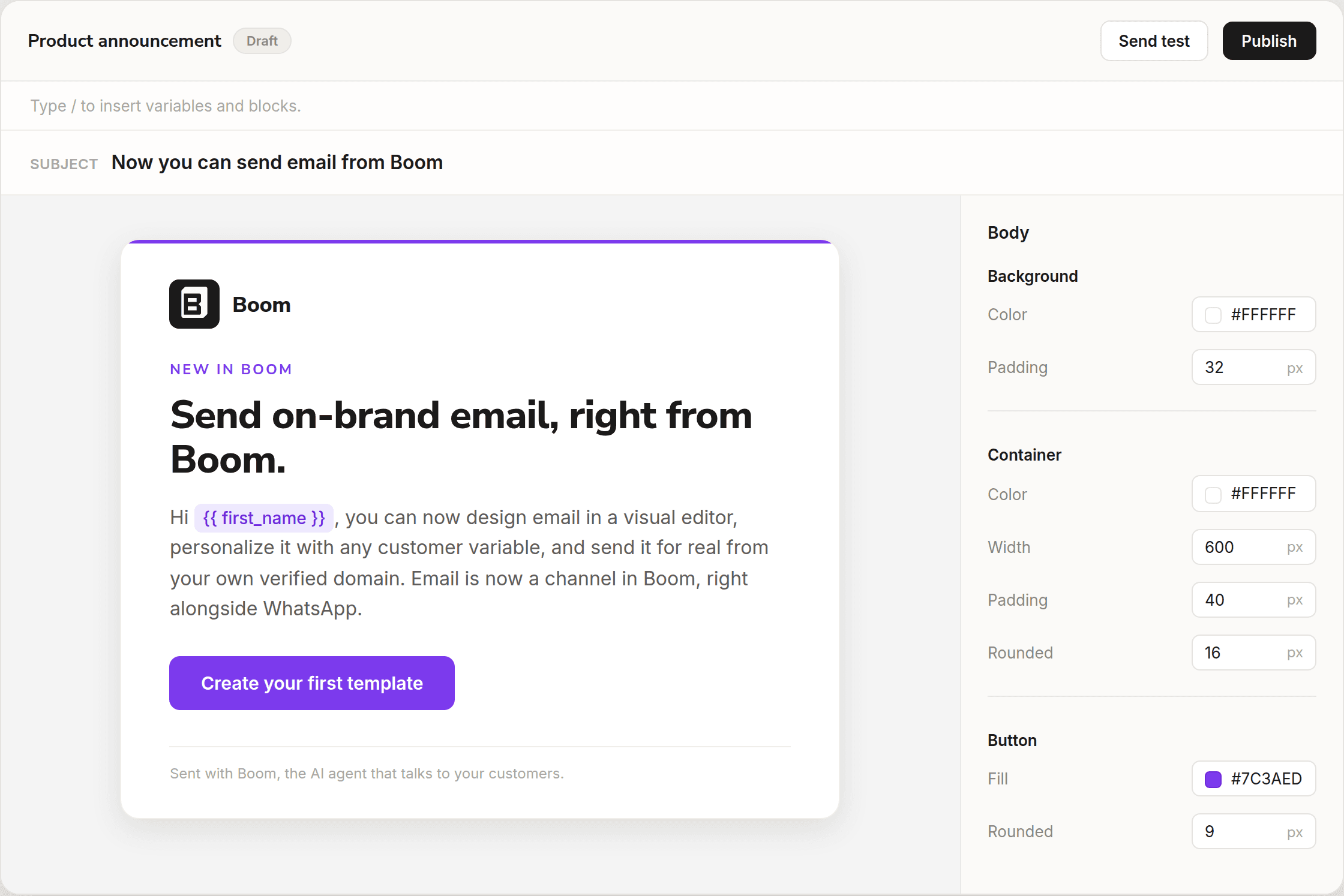
The Boom email builder with an announcement email being composed in the canvas: a subject line, a branded email with a personalization variable and a call to action, next to the styling panel for background, container, and button

Author and send on-brand emails

You can now author on-brand email templates in a rich editor: write your copy, drop in customer variables from a slash menu, and start from a gallery of ready-made templates (welcome, onboarding, reactivation, and more). Send a test to yourself, then send for real from your own verified domain, so email becomes a fully operated channel alongside WhatsApp.

Use event data as variables in Journeys

In the visual Journey Builder, WhatsApp message steps can now pull fields from your custom events as variables. When a journey is triggered by an event, pick its properties (like plan_tier or order_total) from a dropdown and drop them straight into your message, so each send is personalized with the data that started the flow.

Public API and MCP for Initiatives and results

The public REST API and MCP server now read your research Initiatives and the data they collect: list and get initiatives, participants, and their extracted variables, plus a per-initiative summary of engagement and results. Personal and internal fields stay hidden, so your own systems and agents can pull insights safely.

Minor improvements

A few smaller improvements from this week.

  • You can now reference context files inside an initiative's context block with an @ mention, and they render as inline chips so it's clear which files the agent is using.
  • The initiative detail view now shows attached assets as chips, so you can see what's linked at a glance.
  • The initiative tester can now impersonate pre-launch enrollment requests, so you can preview exactly how an enrollment will behave before you go live.
  • The initiative tester opener no longer invents a placeholder name, so test conversations start with a clean, realistic first message.
  • The agent no longer shows internal tool preamble in its replies, keeping customer-facing messages clean.

Minor improvements

A few smaller improvements from this week.

  • Archived templates are now viewable: a new "Show archived" toggle on the templates list lets you find and review templates you previously removed.
  • WhatsApp templates now submit for approval automatically when you create them, so you no longer need a separate manual step.
  • The initiative tester now opens with a preview of the journey's real WhatsApp template instead of a generated message, so what you test matches what customers receive.
  • The journey builder no longer discards unsaved changes when you switch browser tabs and come back, protecting work in progress on the canvas.
  • Survey re-extraction is unblocked: initiatives without a fixed schema can be re-analyzed, so you can refresh survey results after making changes.

Add people to a journey without a CSV

You can now enroll people into a journey by picking them manually from your CDP or by taking a snapshot of an entire segment, with no CSV upload required. Each source can be added as pending or start the journey right away.

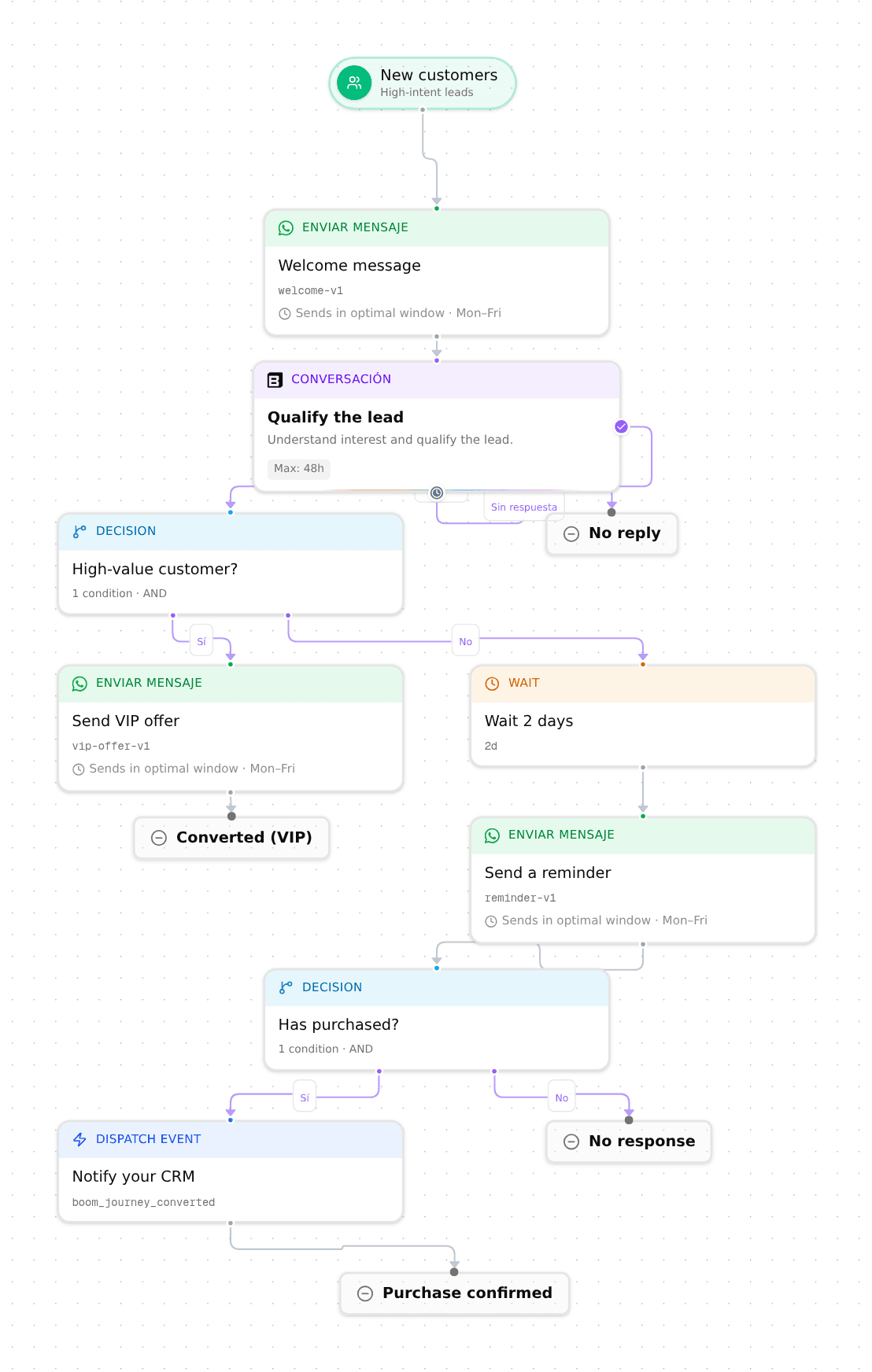
The visual journey builder showing a branching flow: an entry for new customers, a welcome message, a qualify-the-lead conversation, and two decision nodes that split into VIP, reminder, and notify-your-CRM paths, each ending in its own outcome

Journeys are now available to everyone

Journeys are now available to every organization, no longer behind a preview flag. Build automated, multi-step flows over WhatsApp in the visual builder: branch on customer data with decision nodes, wait, send messages, run a conversation, and dispatch events, with each path ending in its own outcome. Access is role-based: admins have full control, and other roles get read-only access.

See the first page of a PDF in message previews

Message templates that attach a PDF now show the first page of the document in the WhatsApp media preview, instead of a generic file icon. You can confirm you attached the right document before sending.

Public API and MCP for Segments and the CDP

A new public REST API lets you create and preview segments and read your CDP catalog (relationships, custom object types, and relationship types) from your own systems. The same data is available through an MCP server, so your own agents can query Boom directly.

Minor improvements

A handful of smaller improvements across segments, journeys, and templates:

  • Personalize messages with computed values: calculated segment values, such as a summed subscription amount, can now be used as variables in journey messages.
  • Import people by CSV: add people to the CDP People tab through a CSV upload or one by one.
  • Cleaner template management: Boom now creates fewer duplicate template variations per round, and follow-ups reuse approved copy.
  • Smoother CSV enrollment: the add-contacts wizard handles column mapping and large files more reliably.
  • Accurate relative times: recently created records no longer show timestamps in the future.
  • Tidier initiative assets: the assets inherited from your organization now start collapsed.

New initiatives set up their journey and messages for you

When you create an initiative, Boom now builds the first draft of its journey and outreach messages automatically in the background, including a message for each follow-up round, reusing your approved templates when they fit. Starting a new campaign goes from a blank canvas to a ready-to-review draft.

Control how deep the agent follows up on each question

You can now set how far the agent digs in on each guiding question, from no follow-up to a deep, multi-turn probe. Use lighter follow-ups for quick survey-style questions and deeper ones where you want richer, more detailed answers. This gives you finer control over the length and depth of every interview.

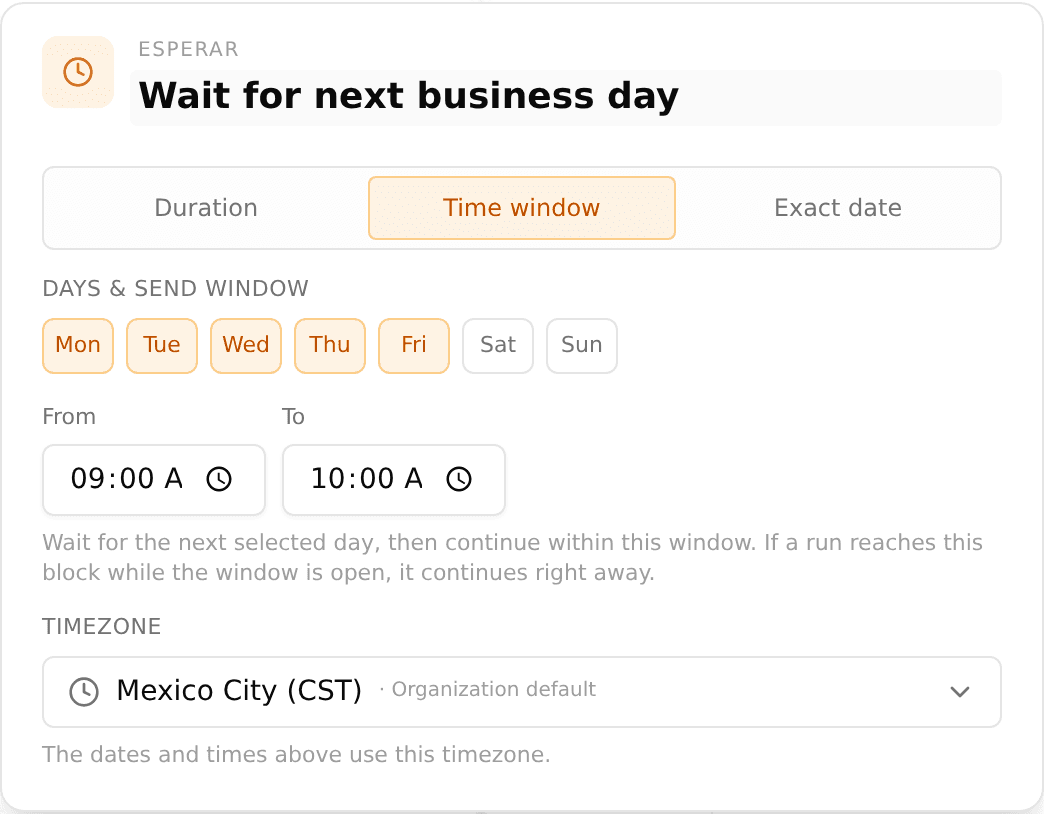
Journey Wait step settings panel with the Time window mode selected, with weekday chips Monday to Friday active, a 9:00 to 10:00 send window, and a timezone selector

Schedule a journey wait until a date or weekday

The Wait step in journeys can now hold a contact until a specific date and time, or until the next weekday you choose (for example, the next Monday at 9 AM) in your organization timezone. Before, a wait could only pause for a relative amount of time. Now you can align messages with launches, deadlines, or business hours.

Minor improvements

A few smaller upgrades:

  • A zoomable image viewer in conversations, WhatsApp style, with pinch, scroll, and double-click zoom plus thumbnails.
  • Click to copy any value in the conversation context panel.
  • Starting a New message is no longer blocked when the contact already has a conversation.
  • Connect a database through an SSH bastion (jump host), for data behind a private network.

Start segments from a template

You can now build a segment from a library of common templates (for Shopify, Skio, and connected databases) instead of starting from a blank filter. Pick a template, adjust it, and your audience is ready. Segments are also now reachable over the public API.

A simpler way to create initiatives

Creating an initiative is now just an objective and a bit of context, and you are done. The long multi-field setup form is gone, so you can launch a research or outreach initiative in a fraction of the time.

Minor improvements

A handful of smaller fixes across the inbox and engagement views:

  • The engagement timeline now shows which branch a decision took and how long a delay lasted, in English, Spanish, and Portuguese.
  • The conversation list filter can now include archived initiatives.
  • Runs lists show a contact's email instead of a raw internal id.
  • You can only reply to a conversation that is assigned to you, so replies no longer get lost in the unassigned view.
  • A cleaner events table with corrected relative timestamps.

Shared Inbox for every team

The Shared Inbox is now on for every team on your plan, with no setup required. Anyone with inbox access can see and reply to conversations across WhatsApp and your other channels from one place.

The shared inbox with a sidebar of saved views including a dedicated Resolved view and unread count badges, an All view filtered to open conversations, and filter tabs above the conversation list

A clearer inbox

The inbox got a round of polish: resolved conversations now look visually distinct, the All view shows only open conversations with a count badge, actions update the list instantly, and the context panel surfaces a contact's channel and identity even when there is no match in your data yet.

Personalize journey messages

Journey messages can now pull in variables from your data and from the events that triggered them, so each customer gets a message written for their context. Picking the event that starts a journey is clearer too, with a branded event picker.

The People directory showing a paginated table of customers with avatars, active status badges, creation dates, and related record counts

Explore your people

A new People directory lets you browse everyone in your customer base in one paginated table, then open any profile to see their attributes, events, and conversations across tabs. Find the right person and understand them at a glance.

Smarter segment attributes

Segments can now use computed attributes like number of orders or total spent, calculated for you from each person's history, plus match on list and tag values. Build audiences around behavior, not just static fields.

The Integrations directory with connector cards for PostgreSQL, MySQL, and Skio, each marked available, where Skio syncs subscription lifecycle data

Connect Skio

You can now connect your Skio subscriptions to Boom from the Integrations page, using a self-serve API key. Bring your subscription data in so your segments and journeys can act on it.

More control over journeys

Journeys got three new controls: a frequency cap so a customer never gets too many messages, a node that fires an event into the CDP as the journey runs, and the ability to remove a customer from a journey the moment a chosen event happens.

Run multiple WhatsApp numbers

Boom now supports more than one WhatsApp business account at once. Choose which number sends each step of a journey, and templates stay scoped to the account they belong to across journeys and the inbox, so the right sender and the right templates always line up.

Deeper segment filters

Segments can now filter across related records and reach into nested attributes. Build a segment that follows the link from a customer to their orders, or matches on a value buried inside a JSON field, all from the same builder.

Build segments by asking

Describe the audience you want in plain language and the agent builds the segment for you, turning your request into the right conditions, including links to related records and nested fields. No manual filter setup required.

An inbox performance dashboard showing total conversations, median first-reply and resolution times, automation rate, and charts for volume by operator and response time over time

Conversation analytics

A new analytics dashboard shows how your conversations are going, with volume over time, response times, an hourly activity heatmap, and an operator leaderboard. Filter by the dimensions that matter and see where to focus.

Boom now speaks Portuguese

Boom is now available end-to-end in Portuguese (pt-BR), both the operator dashboard and the agent itself. Set Portuguese as your workspace's default language and run conversations natively in Brazil.

A clearer, faster inbox

The shared inbox got a rework. Every conversation row now shows which channel and number it came from, a new filter bar lets you slice by channel, and search was rebuilt to scan across all sessions of a conversation, returning results in milliseconds instead of seconds.

A WhatsApp conversation in the shared inbox with a configurable context panel on the right showing customer attributes, related orders, and a link out to the customer's record

A context panel built for your team

You can now configure exactly what your operators see next to each conversation: customer attributes, related records like orders or loans, and deep links into your own systems. Set it up once and every agent gets the context they need to resolve faster.

The inbox reply composer with the quick-replies menu open, listing saved replies triggered by typing a slash command

Quick replies in the inbox

Save your team's most common responses and drop them into any conversation with a / shortcut or a button. Edit before sending, and search across all of them. Quick replies are separate from WhatsApp templates, so they're yours to manage.

Build segments yourself

The new segments builder lets you combine conditions with AND/OR in a simple three-step flow. Schedule a segment to refresh daily at the hour you choose, and export the full membership to CSV.

The integrations screen showing available data-source connectors (PostgreSQL and MySQL) to sync customers and attributes into Boom

Connect your own data

Boom can now read your customer data straight from your own database, with no CSVs and no middle layer. Model real-world relationships like one buyer across many merchants, push behavioral events such as a completed payment, and segment on what your customers actually do. A documented public API keeps everything in sync with your systems.

Journeys that trigger on events

A journey can now enroll a customer the instant something happens, like a completed order or a churn-risk signal, straight from a CDP event. There's no CSV and no waiting for the next segment refresh. The right message goes out in the moment.

Test your agent before you launch

You can now chat with your agent right inside the initiative. It's a live test that runs the real pipeline and streams responses as they generate, so you can try multi-turn flows and edge cases before any customer sees them.

Shopify, connected natively

Connect your Shopify store in a few clicks and Boom keeps customers, orders, and your full product catalog continuously in sync. The agent can reference real products in the conversation, with their images and descriptions.

Internal notes on conversations

Leave internal notes in a conversation thread to pass context to a teammate, drop a reminder, or note a handoff detail. Notes stay private to your team and never reach the customer.

Your agent answers from your files

Upload your documents, like product sheets, policies, and FAQs, and the agent searches them to answer customer questions. It pulls the right passage from the right file, so replies stay grounded in your own content.

Boom is now multichannel

Boom now runs on WhatsApp, Instagram, Facebook, web chat, and email (beta), with support for multiple WhatsApp numbers per workspace. Every channel lands in one shared inbox, and the agent answers with the same customer context no matter where the conversation starts.

Export many transcripts at once

Beyond downloading a single conversation, you can now export the transcripts of many conversations at once, as a single consolidated .txt you can hand off or analyze in bulk.

The agent sends media on WhatsApp

Your agent can now send images, PDFs, and video in WhatsApp conversations, not only text. It shares receipts, product sheets, or onboarding docs right inside the chat, picking the right file for the moment.

Initiative detail view with "Contactos" highlighted as a dedicated section in the left sidebar

Contacts moves to the initiative sidebar

Contacts is now a dedicated section in the initiative sidebar, easier to reach, with a unified view of engagement status, filters, and bulk actions to start journeys.

Conversation detail with a download menu showing Text (.txt) and JSON (.json) export options

Download any conversation transcript

You can now download the full transcript of any conversation, as plain text (.txt) for quick sharing, or as JSON (.json) to feed into your own analysis.

Boom Voice sounds more human

We deployed a new version of Boom Voice. It sounds dramatically more natural, perfect for Research campaigns running over voice.

Introducing Boom Surveys

You can now run Boom Surveys: shorter, focused conversations to ask your customers a specific question and get fast answers.

Use Surveys when a full Research interview is more than the moment calls for: a quick pulse after a release, a single follow-up question, or a targeted check-in with a segment.

The Boom command center with a chat input that says "Ask anything about your organization", quick actions to summarize interview results, create an initiative, show engagement stats, and draft an insight report, plus a list of recent initiatives

Meet the Boom Agent

We built an agent at Boom that controls the entire platform.

It can create research initiatives. Change settings. Add context about your company. All through a conversation.

Read more →

The Boom Initiative Detail view, showing a research initiative with an objective, guiding questions, and a timeline

Customer interviews in 2 days

Define your research objective. Add the guiding questions you want answered. Boom does the rest.

Boom Research runs personalized, context-aware customer interviews at scale over WhatsApp, email, and voice, turning what used to take weeks of recruiting and scheduling into a 2-day workflow. Each conversation feels human, follows the thread your customer opens up, and stays focused on the questions that matter to you.

When the conversations are done, Boom synthesizes every transcript into an actionable insight report, so you go from "let's talk to users" to "here's what we learned" in days, not quarters.